Welcome to Karya.cloud CRM
Karya.cloud CRM represents a sophisticated, cloud-based system meticulously engineered to empower businesses in managing and elevating their interactions with customers, leads, and partners. This platform serves as a centralized hub, enabling teams to efficiently store comprehensive customer information, track communication histories with precision, manage dynamic sales pipelines, automate repetitive administrative tasks, and extract critical intelligence through advanced analytics and reporting functionalities.
As a Software-as-a-Service (SaaS) solution, Karya.cloud CRM is hosted online, providing universal access from any location. This inherent accessibility makes it an optimal tool for geographically dispersed or remote teams, as well as for organizations operating across multiple physical locations. The system encompasses a broad spectrum of features, including robust contact and lead management, integrated email and activity tracking, advanced task automation capabilities, granular customer segmentation tools, and seamless integration with other essential business applications such as marketing platforms or help desks.
The strategic importance of an effective Customer Relationship Management (CRM) system for modern businesses cannot be overstated. A CRM system is fundamental for the proficient management of a sales pipeline, furnishing sales teams with indispensable tools to diligently track leads, cultivate robust customer relationships, and automate routine operational tasks. Simultaneously, it delivers detailed analytics on sales performance, offering a holistic view of the sales landscape.
Beyond its direct impact on sales, a comprehensive CRM strategy enables businesses to foster exemplary customer service across every touchpoint of the customer journey. It facilitates the meticulous tracking of leads as they progress through the sales funnel, refines and enhances marketing initiatives, systematizes sales management tactics, and clarifies inter-departmental communication, thereby fostering enhanced collaboration. Such a system significantly mitigates instances of outdated information, errors, and missed opportunities, invigorates the lead funnel to boost lead generation, and establishes Key Performance Indicators (KPIs) crucial for precise future planning and strategic initiatives. Without a well-defined CRM strategy, teams may easily lose sight of their objectives and encounter operational disarray.
The functionality of Karya.cloud CRM extends beyond a mere collection of tools; it functions as a strategic enabler. Its true value lies in its capacity to integrate and optimize entire business processes—spanning sales, marketing, and customer service—for overarching growth and efficiency. This signifies that the CRM acts as a central nervous system for all customer-facing operations, directly influencing revenue, customer satisfaction, and the overall health of the business by centralizing data for unified and coordinated action. The effective implementation of Karya.cloud CRM thus extends far beyond simply utilizing its features; it involves leveraging the platform to drive strategic alignment and operational excellence across the entire customer lifecycle.
Your CRM Command Centre
The Karya.cloud CRM dashboard functions as a centralized, real-time command centre, offering a comprehensive and dynamic view of key CRM metrics and pipeline data. It visually presents critical intelligence, including overall targets, a general overview of leads, deals, closed-won percentages, total deal amounts, and generated revenue. The dashboard also highlights top performers in deals, provides a graphical representation of deals based on their stages, displays individual targets assigned to the user, identifies top-performing lead sources, and showcases top-performing territories. Additionally, it meticulously tracks campaign expenditure, offering a clear depiction of marketing investments. Equipped with intuitive visual charts and quick-access widgets, the dashboard empowers Team Leads to efficiently monitor workforce trends and make informed, data-driven decisions.
- ● Targets:All targets established by the organization are accessible to users and are determined using team data.
- ● Overview:Shows data on leads, deals, win rate, deal values, and revenue.
- ● Top Performers:This section displays all individuals who have achieved top performance in deal execution.
- ● Deals:All deals, categorized by stage, can be displayed in a graphical format.
- ● Individual Targets:All user-assigned targets are presented on the dashboard, accompanied by a graphical summary for comprehensive review.
- ● Leading sources of high-performing leads:These are the sources or channels that generate the highest number of quality leads — the ones most likely to convert into customers.
- ● Top performing Territories:These are the regions or areas that have shown the best sales performance based on key metrics such as the number of deals closed, revenue generated or lead conversion rates.
- ● Campaign Spent:Campaign spent refers to the total amount of money used for running a specific marketing or sales campaign. It includes costs such as ad spending, promotional activities, platform fees, and any other related expenses.


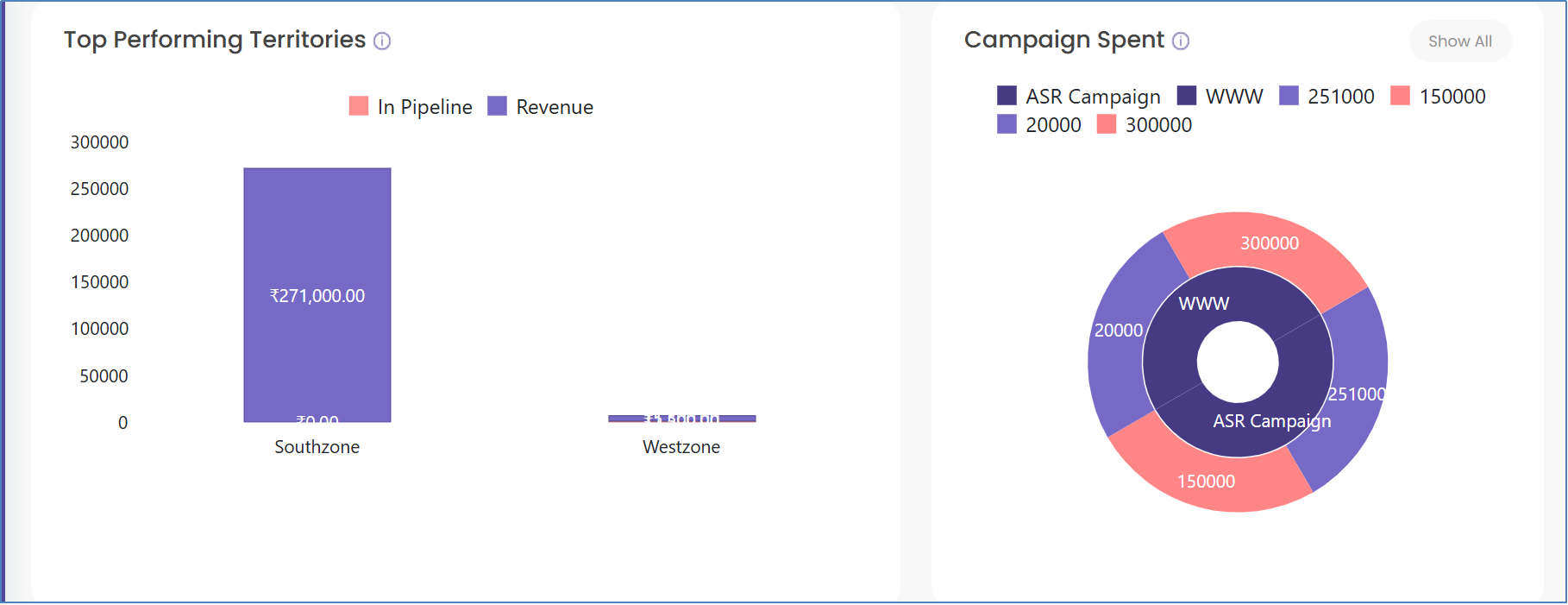
A CRM dashboard within Karya.cloud functions not merely as a reporting interface but as a dynamic, real-time strategic instrument. When consistently populated with clean and accurate data, it facilitates agile responses to evolving market conditions and internal performance challenges, fostering proactive management. The dashboard's inherent power lies in its capacity to translate complex raw data into clear, actionable intelligence, guiding where to strategically invest time, resources, and effort for maximum return on investment. For instance, Karya.cloud's dashboard explicitly identifies "top performing lead sources" and "top performing territories". This capability, when combined with best practices, allows for the identification of high-performing areas, which then informs strategic decisions such as allocating more marketing budget to a particular channel or refining targeting efforts. This transforms raw data into direct directives for sales and marketing teams.
A consolidated table can concisely summarize the critical link between each dashboard metric and its actionable purpose, serving as a quick-reference guide for users to immediately grasp the strategic utility of each component.
| Metric Name | Description | Purpose / Actionable Intelligence |
| Targets | Users can view all targets set by the organization, based on team data. | Provides a clear understanding of organizational objectives and team-based goals, enabling strategic alignment and performance monitoring. |
| Overview | Presents data on leads, deals, closed-won percentage, deal amounts, and revenue generated. | Offers a high-level summary of sales pipeline health, allowing for quick assessment of overall business performance and identification of areas requiring attention. |
| Top Performers | Displays top performers in deals. | Facilitates performance evaluation, enabling managers to identify, support, coach, and reward high-achieving team members, and to learn from successful strategies. |
| Deals by Stages | Shows all deals based on their current stages in a graphical presentation. | Visualizes pipeline progression, helping identify bottlenecks, predict future revenue, and ensure deals are moving efficiently through the sales funnel. |
| Individual Targets | All targets assigned to the user are displayed with a graphical overview. | Provides individual accountability and motivation, allowing sales professionals to track their progress against personal goals and manage their workload effectively. |
| Top Performing Lead Sources | Identifies sources or channels generating the highest number of quality leads most likely to convert. | Guides marketing budget allocation and campaign optimization by highlighting the most effective lead generation channels, ensuring investment in high-ROI activities. |
| Top Performing Territories | Identifies regions or areas with the best sales performance based on key metrics. | Informs sales territory optimization, resource allocation, and targeted sales strategies by pinpointing geographical areas with high conversion rates or revenue generation. |
| Campaign Spent | Refers to the total amount of money used for running a specific marketing or sales campaign. | Enables the evaluation of marketing and sales campaign effectiveness against expenditure, supporting data-driven decisions on future investment and budget optimization. |
| Sales Cycle Length | The average time it takes to convert a lead into a closed deal. | Identifies efficiencies or inefficiencies in the sales process, allowing for targeted interventions to shorten conversion times and improve sales velocity. |
| Win/Loss Ratios | The percentage of deals won versus lost. | Provides critical feedback on sales effectiveness, helping to refine sales strategies, identify common reasons for losses, and improve overall closing rates. |
Nurturing Your Future Customers
A lead is defined as an unqualified prospect—an individual or organization that has expressed initial interest in a product or service but has not yet undergone full vetting or nurturing. It represents a "first touch" point within the sales funnel, where basic contact information is known, but the potential for conversion into a paying customer is still being assessed.
To add a lead in Karya.cloud CRM, the process involves a few straightforward steps:
- 1. Navigate to the CRM section from the Main Menu bar located in the top right corner of the interface.
- 2. Next, from the left sidebar, select "Leads." A dropdown menu will appear, from which "My/Manage Leads" should be chosen.
- 3. Finally, locate and click the "add" button to initiate the creation of a new lead within Karya.cloud CRM.

My Leads vs. Manage Leads: Understanding Access
Karya.cloud CRM distinguishes between "My Pages" and "Manage Pages" to control user access and data visibility for leads and deals. "My Pages" are exclusively accessible to individual employees or team members. Users operating within "My Pages" can view data they have personally entered or data pertaining to leads or deals that have been directly assigned to them.
In contrast, "Manage Pages" are designed for and accessible by team leads. These users possess the capability to view not only their own data but also the data submitted by their team members. To effectively access and manage team members' leads, it is imperative that the team lead has been granted appropriate team lead permissions, which are configured during the team management setup.
Managing Lead Status & Workflows: Customization and Automation
Within the context of leads, "status" refers to the current stage or condition of a lead as it progresses through the sales or conversion process. This serves as a critical tool for tracking a lead's journey from initial contact to eventual customer conversion. Karya.cloud CRM provides robust flexibility, allowing businesses to create custom lead statuses. This customization enables organizations to precisely tailor lead progression stages to align with their unique sales processes and internal terminology.
To create a custom status for leads in Karya.cloud CRM,
- 1. The user must navigate to the CRM section from the Main Menu bar at the top right.
- 2. From the left sidebar, "Leads" is selected,
- 3. Followed by "Manage status" from the dropdown menu.
- 4. The process concludes by clicking the "add" button to define and create the new custom status.

Defining Lead Status Workflow
A lead status workflow is a structured framework that precisely defines how a lead’s status changes over time. These changes are typically triggered by specific actions undertaken by sales or marketing teams, or by the lead itself (e.g., responding to an email, booking a demonstration, or engaging with content). To establish a status workflow for leads in Karya.cloud CRM, users again start from the CRM section in the Main Menu, then select "Leads," and subsequently "Manage workflow" from the dropdown. The final step involves assigning the corresponding sequence of values that should be displayed in the dropdown for each status, based on the previously defined statuses. For example, if a lead is initially created with the status "New," the system must be configured to appropriately display options for transitioning the status from "New" to "In Progress," and so forth.
Karya.cloud's capability to create custom lead statuses and workflows represents a foundational feature. The broader understanding of CRM functionality highlights that such workflows can automate critical processes like lead scoring, lead assignment, and lead qualification. This establishes a direct causal link: Karya.cloud's customization features enable the operationalization of these automated processes. By automating status changes (as implied by email workflows, which often trigger on status changes) and subsequent actions (such as assigning leads to sales representatives or initiating nurturing sequences), businesses can significantly enhance sales velocity and efficiency. This proactive approach actively prevents leads from becoming stagnant or being overlooked, thereby streamlining the sales cycle. The strategic implementation of custom workflows within Karya.cloud CRM is not merely about organizing lead progression; it is about creating an automated, intelligent system that minimizes manual effort, ensures timely follow-ups, and ultimately accelerates the entire sales cycle, leading to higher conversion rates.

Territories, Sources, and Custom Fields
Territories: "Territories" in Karya.cloud CRM refer to defined segments or geographic areas that are strategically assigned to sales or service teams. The fundamental purpose of establishing territories is to manage customer relationships, leads, and opportunities with greater efficiency and effectiveness. To create territories for leads in Karya.cloud CRM, users navigate to the CRM section from the Main Menu, select "Leads," then "Manage territories" from the dropdown, and finally click the "add" button to define a new territory.

Lead Source:A "Lead Source" defines the specific method, marketing campaign, or platform that initially brought a lead into the CRM system. Tracking lead sources is essential for businesses to accurately ascertain the origin of their leads, which in turn allows them to assess the effectiveness and return on investment (ROI) of various marketing and sales initiatives. The process for creating a lead source in Karya.cloud CRM mirrors that of territories: access CRM from the Main Menu, select "Leads," then "Manage Sources" from the dropdown, and click the "add" button to establish a new source.

Lead Item Settings: "Item Settings in Leads" typically refer to configurable fields, dropdowns, or properties directly associated with a lead record. These may include specifying which products, services, or categories are relevant to that particular lead. Such item settings can also be utilized on the deal edit page to associate products or services with a specific deal.
Lead Custom Fields: Karya.cloud CRM offers the capability to create custom fields for leads. These custom fields enable the capture of additional, unique information that may not be included in the default lead fields provided by the system. This feature is invaluable for tailoring the lead form to align precisely with a business's unique processes, specific product offerings, or distinct customer types. To create custom fields for leads, users navigate from the main menu bar to CRM, then to "Leads," and select "custom fields" from the dropdown. The final step involves enabling the required fields and naming them appropriately to suit specific business requirements.


Lead Qualification Methodologies (BANT, SPIN, MEDDIC)
Effective lead qualification is paramount for optimizing sales efforts and ensuring that resources are directed towards the most promising opportunities. Several industry-standard methodologies guide this process:
- ● BANT (Budget, Authority, Need, Timeline): Developed by IBM in the 0s, BANT is a straightforward methodology that prioritizes four key considerations for rapid sales qualification. Its primary strength lies in its simplicity and speed in evaluating prospects, allowing sales teams to quickly qualify or disqualify leads. However, its limited scope may not provide deep insights into a prospect's underlying pain points and is often less suitable for complex BB sales scenarios that necessitate a more consultative approach.
- ● SPIN (Situation, Problem, Implication, Need-payoff):This methodology, rooted in Neil Rackham's research, is highly customer-centric. It focuses on asking open-ended questions to uncover a prospect's pain points and then systematically demonstrating how the product or service can effectively address those needs. Its strengths include fostering trust and enabling the tailoring of solutions to specific customer requirements. Nevertheless, it can be time-consuming and demands highly skilled sales representatives to execute effectively, making it less ideal for transactional sales with short cycles.
- ● MEDDIC (Metrics, Economic buyer, Decision criteria, Decision process, Identify pain, Champion):MEDDIC provides a comprehensive and rigorous framework for qualifying opportunities by focusing on six key factors. It is highly customer-centric, compelling sales representatives to thoroughly understand the prospect's pain points and decision-making processes. This approach can build significant trust and credibility. However, its rigidity and complexity can pose a disadvantage in fast-paced sales environments, often necessitating more extensive sales training for effective implementation.
Karya.cloud CRM provides the flexibility to manage lead statuses and workflows. The distinct lead qualification methodologies (BANT, SPIN, MEDDIC) each possess specific strengths and weaknesses tailored to different sales contexts, ranging from transactional to complex BB sales. This implies that businesses should not merely utilize Karya.cloud's lead features generically but must strategically select and then implement a specific qualification framework (or a hybrid approach) within Karya.cloud's customizable lead statuses and workflows. For instance, an organization with short, high-volume sales cycles might configure Karya.cloud's lead statuses to reflect a simplified BANT approach. Conversely, a company engaged in complex enterprise sales would design more detailed stages aligned with SPIN or MEDDIC to capture deeper insights into customer needs and organizational dynamics. This strategic choice directly influences the quality of leads passed to sales and ultimately impacts conversion rates. The inherent flexibility of Karya.cloud CRM's customization features should be deliberately leveraged to operationalize a chosen lead qualification methodology. This ensures that the sales process is optimized for both efficiency and effectiveness, directly impacting the quality of leads entering the sales pipeline and improving overall conversion rates by focusing sales efforts on the most promising opportunities.
A comparative table of these methodologies offers a concise, side-by-side view that highlights their key distinctions and appropriate applications, facilitating a strategic choice that can then be accurately configured within Karya.cloud's customizable lead stages, ensuring consistency and effectiveness in lead qualification.
| Methodology | Acronym Meaning | Primary Focus | Strengths | Weaknesses | Ideal Use Case |
| BANT | Budget, Authority, Need, Timeline | Rapid qualification based on four key criteria | Simple, quick for evaluating prospects, efficient qualification/disqualification | Limited insight into pain points, less adaptable to complex sales, accuracy issues early in cycle | Short, transactional sales cycles where quick evaluation is prioritized |
|---|---|---|---|---|---|
| SPIN | Situation, Problem, Implication, Need-payoff | Uncovering prospect pain points through questioning and demonstrating solution value | Highly customer-centric, builds trust, enables tailored solutions, consultative approach | Time-consuming, requires skilled reps, may not cover all sales process aspects (e.g., objections) | Solution-based selling, complex sales where understanding deep needs is critical |
| MEDDIC | Metrics, Economic buyer, Decision criteria, Decision process, Identify pain, Champion | Rigorous qualification focusing on six key factors for comprehensive opportunity assessment | Comprehensive framework, forces focus on prospect's decision process, customer-centric | Rigid, complex ( steps), requires significant training, can slow down fast-paced sales | High-value, complex enterprise sales with multiple stakeholders |
Automated Lead Nurturing Strategies
Automated lead nurturing serves as a powerful instrument for cultivating relationships with potential customers by delivering personalized and timely content throughout their unique buyer's journey. This process involves the automation of lead nurturing practices, such as sending follow-up emails, providing relevant resources based on specific user behaviour (e.g., abandoned shopping cart emails, event reminder emails, follow-up emails after a guide download, or anniversary emails for existing clients). Automated lead nurturing proves particularly valuable given that modern buyer journeys are rarely linear, audience distractions are prevalent, and in business-to-business (BB) contexts, purchasing decisions often involve multiple stakeholders.
Key advantages of automated lead nurturing include: the automatic qualification, segmentation, and nurturing of leads; the delivery of appropriate content at the opportune moment through behaviour tracking; the creation of multiple paths to purchase via various lead nurturing campaigns; the assurance of consistent nurturing without requiring extensive manual effort; and the provision of automated reporting for performance intelligence.
Karya.cloud CRM allows for the creation of email workflows and custom fields for leads, alongside dynamic mailing lists. Automated lead nurturing strategies emphasize delivering content based on specific user behaviour and adapting to the non-linear nature of modern buyer journeys. This highlights a critical application for Karya.cloud's automation capabilities: they should be configured not merely for sequential email drips but for dynamic, responsive actions triggered by lead interactions. For example, a lead visiting a pricing page could trigger a specific sales email, or downloading a whitepaper could move them into a new, more engaged segment. This represents a shift from simple automation to intelligent, adaptive nurturing. By leveraging Karya.cloud CRM's workflow and segmentation features for behavioural-driven nurturing, businesses can maximize engagement and conversion rates. This ensures that relevant messages are delivered at precisely the opportune moment, which is crucial for navigating today's increasingly complex and individualized buyer landscapes.
Lead Scoring Methodologies
Lead scoring is a strategic process employed by sales and marketing teams to rank prospects by assigning numerical scores based on their potential to convert into customers. This prioritization aids in tailoring outreach strategies and enhancing conversion rates by categorizing leads as hot, warm, or cold.
The general approach to lead scoring involves several steps: first, analysing the current customer base to identify common characteristics and behaviours that historically led to conversions; next, determining which attributes and behaviours most frequently result in a purchase to form the scoring criteria; subsequently, allocating points to each criterion based on its relative importance (with higher points for high-value actions); then, developing a model that incorporates both demographic/firmographic and behavioural factors (e.g., a 0-00 point scale with defined ranges for hot, warm, cold leads); utilizing a CRM or marketing automation tool to automate the scoring process and segment leads; developing tailored engagement and nurturing strategies for each category; and finally, regularly reviewing and adjusting the model to ensure its continued effectiveness.
Key best practices for lead scoring include: ensuring data accuracy, completeness, and up-to-date information; fostering regular communication and collaboration between sales and marketing teams to define criteria and align goals; periodically reviewing and updating lead scoring models to reflect market changes and customer behavior; tailoring criteria to align with detailed buyer personas; and establishing feedback mechanisms from both sales and marketing teams for continuous improvement.
Karya.cloud CRM provides functionalities for custom fields and lead status management. Lead scoring 0 is explicitly highlighted as a best practice that necessitates "regular communication and collaboration between sales and marketing teams to define lead scoring criteria, share insights, and align goals." This illustrates that lead scoring is not merely a technical function for ranking leads but a critical organizational alignment tool. It ensures that both sales and marketing teams share a common understanding and agreement on what constitutes a "qualified" or "hot" lead, thereby reducing friction during lead handoffs and improving the efficiency of the entire sales funnel. Implementing a robust lead scoring system within Karya.cloud CRM, by leveraging its customization features, directly contributes to a unified Go-to-Market (GTM) strategy. This ensures that sales efforts are consistently focused on high-potential leads identified by marketing, optimizing resource allocation and significantly boosting conversion rates across the organization.
Lead Routing Rules and Automation
Effective lead routing is crucial for optimizing sales efficiency and ensuring timely engagement with prospects. Key best practices for effective lead routing include: clearly defining and documenting the lead routing process (covering lead sources, sales team structure, lead data, routing rules, technology, and expected action steps); qualifying inbound leads early and frequently to ensure sales team buy-in and prevent wasted effort; segmenting and personalizing lead journeys in a meaningful way to enhance relevance; balancing the speed of response with the accuracy of lead assignment; strategically utilizing Artificial Intelligence (AI) only where it genuinely adds value (e.g., predictive scoring, data summarization, real-time enrichment); and avoiding overly strict rules that might cause valuable outliers to be overlooked.
AI can significantly enhance lead routing through several applications: predictive lead scoring, which analyzes existing customers to score new leads based on their similarity; data aggregation and summarization, which assists sales teams in qualifying leads faster and personalizing outreach; and AI-powered data enrichment, which continuously updates CRM with lead attributes in real-time.
Karya.cloud CRM facilitates lead assignment (implied by the "My/Manage Leads" distinction and the ability to assign leads in the mobile version). Lead routing best practices introduce a critical trade-off: balancing "speed and accuracy." While rapid response times are crucial for lead conversion, routing a lead to the incorrect sales representative (e.g., one lacking specific territory knowledge or product expertise) can be detrimental, potentially reducing the chances of booking a qualified meeting. This indicates that Karya.cloud's lead assignment features should be configured with sophisticated rules that consider not just immediate availability but also lead attributes (such as territory, industry, and potential value) and the specific expertise of the sales representative. This might involve leveraging AI for smarter, more nuanced routing decisions. Effective lead routing in Karya.cloud CRM extends beyond simple round-robin assignment. It demands an intelligent, data-driven distribution strategy that optimizes for conversion by precisely matching the right lead with the most suitable sales resource. This approach, even if it entails a slight delay for improved quality, ultimately leads to more successful engagements and higher conversion rates.
Optimizing Lead Source Tracking
Lead source tracking provides essential intelligence to identify which marketing channels, campaigns, and touchpoints are effectively generating high-quality leads and which are inefficiently consuming budget. This tracking is fundamental for building effective attribution models and optimizing future marketing investments by connecting each lead to its originating source.
Key best practices for lead source tracking include: standardizing the UTM (Urchin Tracking Module) structure across all campaigns for consistent naming conventions; tracking both first-touch and multi-touch sources to avoid relying solely on last-click attribution, which often provides an incomplete picture of the customer journey; utilizing first-party tracking and cookieless options to comply with privacy regulations and ensure functional tracking despite cookie blocking; enriching and segmenting leads based on source quality to build marketing strategies around lead quality rather than merely quantity; and aligning tracking with the broader growth stack (including analytics, product, and marketing automation tools) to ensure consistent data and prevent siloed intelligence.
Karya.cloud's dashboard displays "top performing lead sources”, and the system allows for the creation of lead sources. However, lead source tracking best practices explicitly advise against relying solely on last-click attribution. Instead, they advocate for understanding the full customer journey by tracking "first-touch and multi-touch sources." This indicates that while Karya.cloud provides foundational reporting on lead sources, a deeper, more sophisticated analysis—potentially requiring integration with other analytics tools (as suggested by "align your tracking with your growth stack”)—is necessary to truly comprehend the complex path to conversion and attribute value across all contributing touchpoints. To fully optimize marketing spend and accurately assess ROI within Karya.cloud CRM, businesses need to evolve beyond simple lead source reporting. This involves embracing sophisticated multi-touch attribution models, ensuring all contributing channels are recognized through standardized tracking (e.g., UTMs), thereby providing a more holistic and accurate view of marketing effectiveness.
Effective Sales Territory Management
Effective sales territory management is a critical component of optimizing sales performance and involves four proven best practices:
1.Building a Strong Data Foundation: This necessitates gathering and integrating current and historical data from various organizational systems. This includes data from the CRM (for deal velocity and win rates), financial systems (for customer lifetime value), and sales enablement tools (for representative performance). The objective is to construct a comprehensive representation of market opportunity. Regular updates to this data are essential to ensure balanced territory assignments.
2.Balancing Workloads: Optimal planning extends beyond merely counting accounts; it acknowledges that diverse types of deals demand different resources (e.g., complex enterprise deals versus numerous small to medium business (SMB) prospects). This involves integrating data-driven insights with human judgment, considering factors such as travel time, geographic spread, deal complexity, sales cycle length, account penetration, growth potential, technical expertise required, and the availability of support teams.
3.Using Territory-Specific Metrics: Instead of relying solely on total revenue to gauge territory performance, it is advisable to utilize a more sophisticated set of Key Performance Indicators (KPIs). These include Revenue Per Account (for assessing risk exposure and growth potential), Sales Velocity (the pace of money flow through the pipeline), Cost to Serve (all resources expended to generate revenue), Market Penetration (captured market share), and Sales Productivity Metrics (the efficiency with which representatives convert their time into revenue).
4.Promoting Cross-Functional Collaboration: Effective territory management requires intelligence from various departments, not exclusively sales. This includes input from marketing (to identify which segments engage most effectively), customer success (to understand which accounts require the most post-sale support or are most likely to expand), and finance (to pinpoint profitability patterns across different customer types and regions). Modern tools can integrate these diverse insights to provide a holistic view.
Karya.cloud's capability to define sales territories provides the structural foundation for effective territory management. The discussion of best practices in sales territory management highlights the necessity of a holistic approach that extends beyond simple geographic segmentation. This involves integrating data from various organizational functions and balancing workloads based on deal complexity and resource availability. This broader perspective indicates that Karya.cloud's territory feature, while fundamental, is most effective when combined with a strategic approach to resource optimization. This means considering not just where leads are located, but also the specific skills of sales representatives, the complexity of deals in a given area, and the support available. The goal is to ensure that sales resources are allocated optimally, preventing burnout and maximizing overall productivity and revenue generation. Territory management within Karya.cloud CRM should be viewed as a comprehensive resource optimization strategy, ensuring that sales efforts are not only geographically targeted but also strategically aligned with available resources and market opportunities.
Advancing Opportunities to Revenue
A deal, often referred to as an "opportunity," signifies a qualified sales opportunity that a sales team is actively pursuing. It represents a potential sale that has progressed further down the sales funnel than a mere lead, indicating that a genuine need, budget, and timeline have been identified.
To add a deal in Karya.cloud CRM, the user initiates the process by navigating to the CRM section from the Main Menu bar located in the top right corner. Subsequently, from the left menu bar, "Deals" is selected. From the resulting dropdown menu, "My/Manage Deals" is chosen. The final step involves clicking the "add" button to create a new deal.

Lifecycle & Stages: Visualization and Customization
A deal’s lifecycle refers to the distinct stages a sales opportunity progresses through—from its initial creation until it is either successfully won or definitively lost. In some comprehensive CRM implementations, this lifecycle may extend to post-sale stages such as renewal or upsell opportunities. The establishment of well-defined lifecycle stages offers several strategic advantages for a sales team: it enables clear visualization of progress, allowing team members to know precisely where each opportunity stands; it facilitates the prioritization of activities, directing effort towards deals that are most ripe for closure; it aids in accurate revenue forecasting by projecting likely outcomes based on the number of deals in each stage; and it supports the automation of workflows, triggering reminders, tasks, or communications at appropriate points within each stage.
"Stages in Deals," also known as Deal Stages or Pipeline Stages, represent the sequential progression steps a potential sale undergoes from its inception to its closure. Each stage precisely defines a point in the sales process, assisting teams in tracking the current status of a deal and identifying the necessary actions required to advance it. Karya.cloud CRM offers the capability to create custom stages for deals, allowing businesses to tailor their sales pipeline to reflect their unique processes. To create a stage for deals in Karya.cloud CRM, users navigate from the main menu bar to CRM, then to "Deals," and select "Manage stages" from the dropdown. The process concludes by clicking the "add" button to define the new stage.
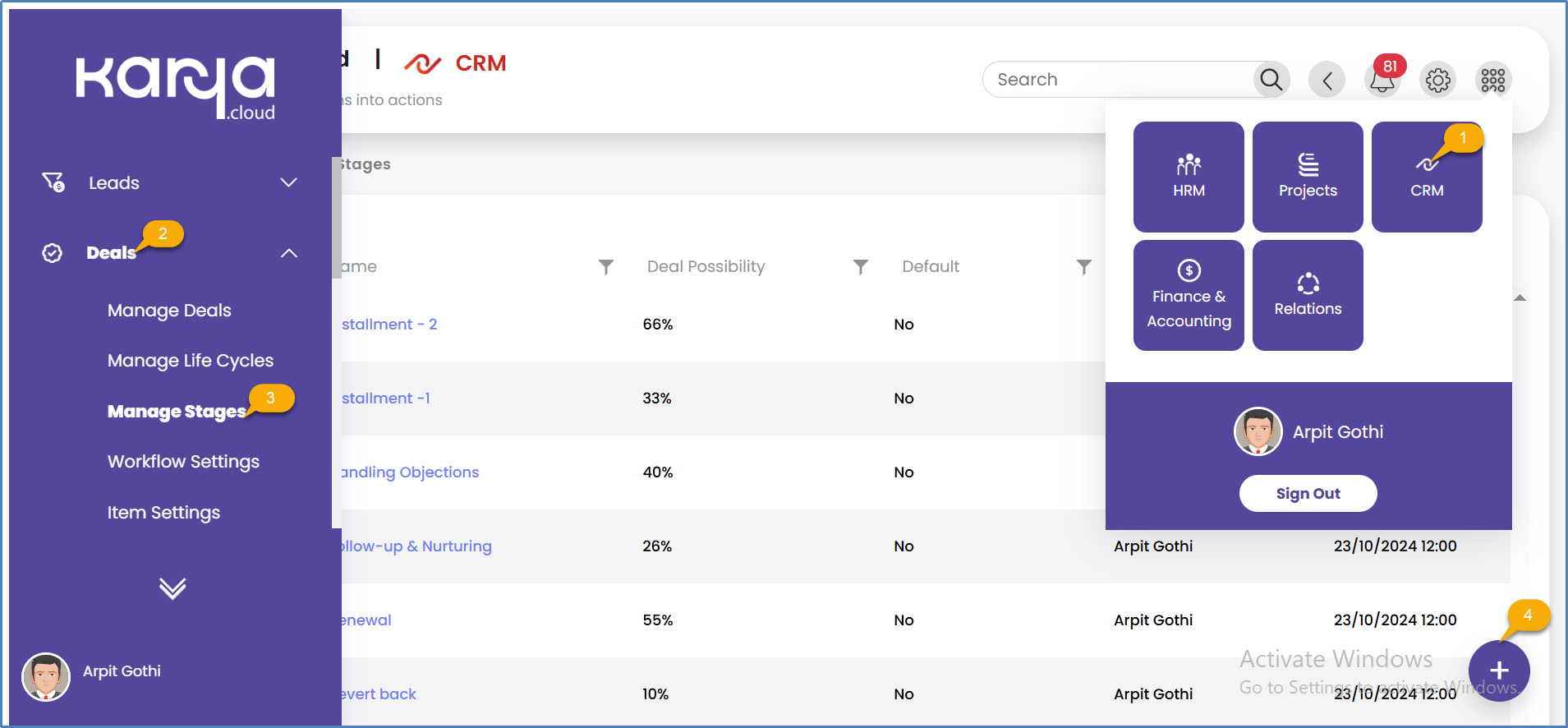
Workflow: Automation for Pipeline Efficiency
A deal workflow is a structured process designed to assist sales teams in consistently managing, tracking, and moving deals through various pipeline stages—from creation to closure. This process often incorporates automation and defined logic to streamline operations. To create a deal workflow in Karya.cloud CRM, users navigate from the main menu bar to CRM, then to "Deals," and select "workflow settings" from the dropdown. The final step involves selecting the appropriate lifecycle name to associate with the workflow. The system automatically sends emails whenever the status or stage changes from one value to another, provided a workflow is added and configured to do so.

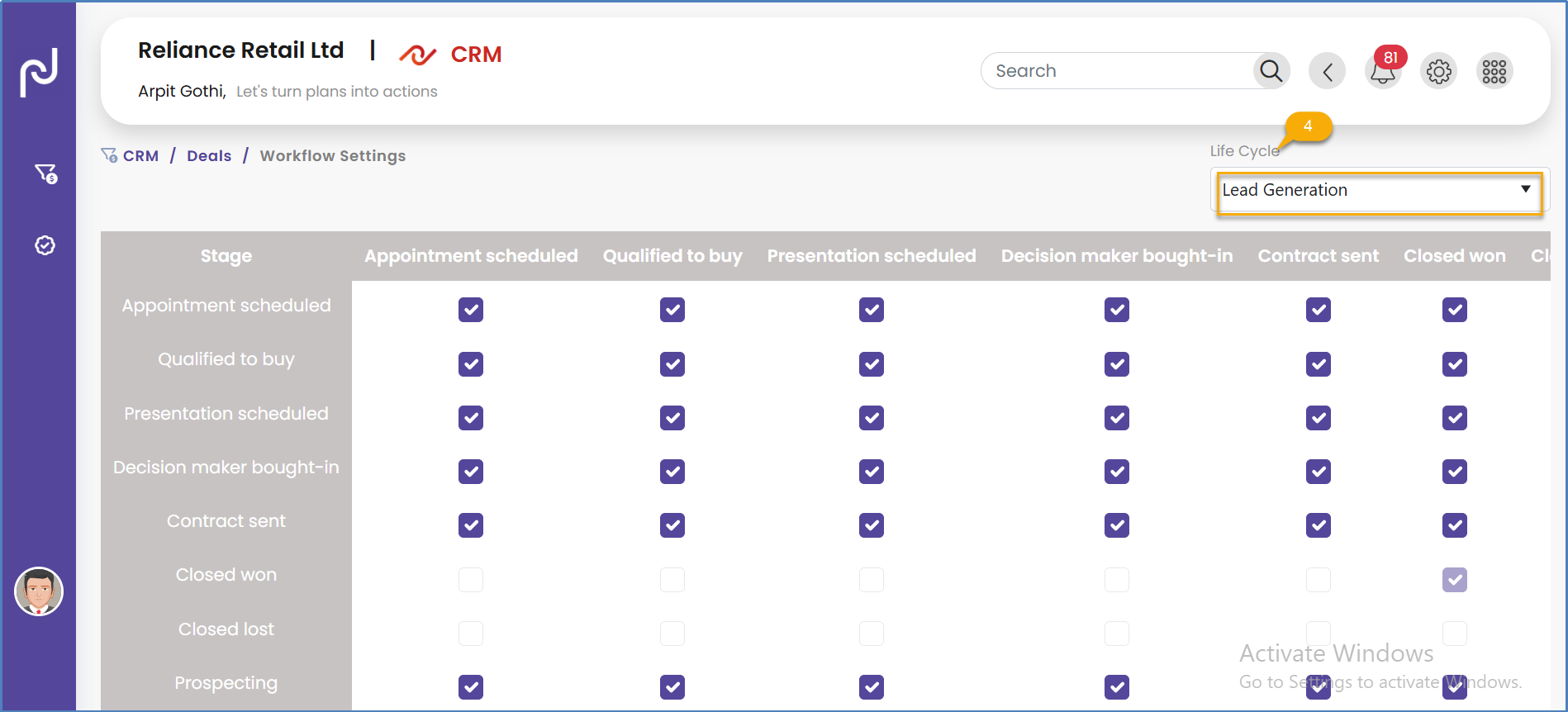
Item Settings & Custom Fields in Deals: Tailoring Data Capture
Item Settings:"Item Settings in Deals" typically refers to configurable fields, dropdowns, or properties directly related to a deal record. These settings might include specifying the products, services, or categories that are associated with a particular deal. Such item settings are utilized on the deal edit page to accurately add products or services against the deal.
Deal Custom Fields:Karya.cloud CRM allows for the creation of custom fields for deals. These custom fields enable the capture of additional information not included in the default deal fields provided by the CRM. They are instrumental in tailoring the deal form to align precisely with a business's unique processes, specific products, or distinct customer types. To create custom fields for a deal in Karya.cloud CRM, users navigate from the main menu bar to CRM, then to "Deals," and select "custom fields" from the dropdown. The process concludes by enabling the required fields and naming them accordingly to suit specific business needs.


Defining Clear Sales Pipeline Stages
Effective sales pipeline management is crucial for maintaining a consistent flow of deals and ensuring sustainable growth. It enables sales teams to track prospects, prioritize leads, and efficiently advance opportunities through each stage of the sales process. Proper pipeline management ensures that no leads are overlooked, directly impacting revenue and sales performance.
The initial step in effective sales pipeline management involves defining clear and distinct pipeline stages. While every company's sales process is unique, universal stages typically apply, such as lead generation, qualification, proposal, negotiation, and closing. Each stage must be meticulously defined and standardized across the sales team to ensure consistency. This clarity helps salespeople understand precisely where a lead or prospect stands in the sales cycle and what actions are required next. It also simplifies the analysis of pipeline performance and improves revenue forecasting. For example, a software company might segment its pipeline into "Initial Discovery," "Product Demo," "Needs Analysis," "Proposal Sent," and "Contract Negotiation." This clear segmentation allows the sales team to know when to advance a prospect and helps managers track the average time spent in each phase, thereby optimizing the overall process.
A sales pipeline is dynamic, changing daily as new leads enter and existing opportunities progress through various stages. Consequently, regular reviews and updates are essential to ensure data accuracy and identify any bottlenecks or stalled opportunities. Sales managers should encourage frequent updates, including the removal of unqualified leads and the addition of new opportunities. Frequent reviews help pinpoint weak spots in the sales process, allowing for timely adjustments, follow-ups, or reprioritization of efforts. This proactive management prevents the pipeline from becoming cluttered with outdated or irrelevant opportunities, ensuring a focused approach.
Karya.cloud CRM's ability to create custom deal stages and workflows provides the necessary tools for defining a sales pipeline. However, the best practices for sales pipeline management emphasize that the pipeline is a dynamic system requiring constant refinement. This means that merely setting up stages is insufficient; continuous monitoring, regular reviews, and proactive adjustments are essential. For instance, if a deal consistently stalls at a particular stage, it indicates a bottleneck that requires immediate attention and process refinement. This constant adaptation, driven by data from Karya.cloud's reporting features, ensures that the sales process remains agile and responsive to market conditions and internal performance. The sales pipeline within Karya.cloud CRM should be treated as a living, evolving system that demands continuous attention and optimization. This approach ensures that the sales process remains efficient, responsive, and ultimately more effective in converting opportunities into revenue.
Sales Forecasting Techniques
Modern Customer Relationship Management (CRM) tools significantly enhance sales forecasting accuracy by transforming it from intuition-based guesswork into a data-driven science. This is achieved through a combination of data analytics, Artificial Intelligence (AI), and intuitive reporting, offering unparalleled intelligence and precision.
The shift from subjective methods to a more objective, data-oriented approach is facilitated by CRM systems that collect and centralize vast amounts of data related to sales activities, customer interactions, and market trends. This centralization provides a comprehensive view of sales activities, customer interactions, and market trends, enabling businesses to forecast sales with greater accuracy and confidence.
Key features of CRM tools that contribute to forecasting include: robust data analytics capabilities for processing and interpreting large volumes of sales data, which helps identify patterns and trends crucial for future sales predictions; predictive analytics, a critical feature utilizing AI and machine learning algorithms to forecast future sales based on historical data and current market trends; and strong integration capabilities, allowing CRM tools to incorporate external data sources such as economic indicators, market trends, and competitive analysis. This provides a more comprehensive view for accurate sales forecasting, ensuring forecasts are data-driven and contextually aware.
Advanced techniques in sales forecasting using CRM include: predictive analytics and machine learning, which go beyond traditional predictions by continuously learning from new data, providing dynamic, real-time sales forecasts aligned with the changing business environment; and integrating market trends and external factors, which offers a holistic market view by incorporating external data sources like economic indicators and competitor activities. This ensures forecasts are contextually aware and adaptable to external factors, providing a competitive edge.
Karya.cloud CRM's ability to provide reports on deals, individual targets, organization targets, and team targets lays the groundwork for sales forecasting. The best practices in sales forecasting highlight that modern CRM tools act as a predictive engine, moving beyond simple reporting to leverage AI and machine learning for more accurate and dynamic forecasts. This means that Karya.cloud's reporting features, when combined with advanced analytical techniques, can transform historical sales data and current pipeline information into forward-looking predictions. This capability allows businesses to proactively adjust strategies, allocate resources more effectively, and respond swiftly to market shifts. The CRM, therefore, becomes a strategic asset for anticipating future sales performance rather than merely reporting past results.
CRM Workflow Automation for Sales Deals
CRM workflow automation offers significant advantages for managing sales deals, streamlining processes, and enhancing efficiency. Several examples of such automation can be applied to sales deals.
Key best practices for CRM workflow automation for sales deals include: automating deal management workflows to oversee and track potential deals throughout the sales pipeline, from lead generation to deal closure, often using conditional routing and automatic task assignment; automating lead scoring workflows to assign values to leads and notify sales teams of high-potential prospects; automating lead and contact generation workflows to reduce manual data entry and auto-create records from inquiries; automating lead assignment workflows to ensure accountability and distribute new opportunities based on detailed "if-then" conditions (e.g., lead source, region, sales representative's online status); automating lead qualification workflows to identify the best leads with the highest conversion probability using a point system based on traits and engagement; automating customer lifecycle management workflows to manage the entire customer relationship beyond just deal closure; and automating account management workflows to alert teams about expiring contracts or renewals.
General best practices for creating CRM workflows include: determining which processes are suitable for automation (typically tasks pertinent early in the sales funnel); thoroughly testing the automation process; involving sales and marketing teams to gain insights into which workflows are beneficial or hindering; following basic setup steps (naming, assigning, setting triggers and actions, saving, and activating); regularly running and testing workflows to evaluate effectiveness; and keeping teams informed about any adjustments.
Karya.cloud CRM's capacity to create deal workflows provides the foundation for automating sales processes. The best practices for CRM workflow automation in sales deals reveal that this automation extends far beyond simple task management. It encompasses sophisticated conditional routing, automatic lead scoring, and dynamic lead assignment, transforming the sales process into an intelligent, self-optimizing system. For example, a deal workflow in Karya.cloud could be configured to automatically assign a deal to a specific sales representative based on its value or industry and then trigger a series of automated follow-up emails or tasks if the deal remains stagnant for a defined period. This level of automation significantly reduces manual oversight, minimizes human error, and ensures that every deal receives timely and appropriate attention, thereby accelerating the sales cycle and improving overall conversion rates.
Action Items: Driving Sales Productivity
Action Items are specific tasks or follow-ups that require completion by an individual or a team. In a sales context, these are tasks assigned to sales representatives with the explicit purpose of advancing deals. Examples include making a follow-up call, sending a proposal, scheduling a meeting, or updating the status of a deal.
Action Items offer several benefits for sales teams: they enhance task clarity, ensuring each salesperson knows precisely what needs to be done and by when, thereby reducing confusion or missed responsibilities. They boost productivity by keeping the team focused on high-priority activities that propel deals forward, preventing time wastage on non-essential work. They strengthen follow-ups, ensuring timely engagement with leads or clients, which is critical for successful sales closures. Action Items also enhance team collaboration, as managers can assign, track, and review team members’ tasks, simplifying work distribution and maintaining alignment. Furthermore, they improve CRM and data accuracy; when action items are linked to CRM updates (such as deal stages or client notes), data remains current and useful. Finally, they contribute to better forecasting and reporting, as knowledge of pending tasks assists managers in forecasting pipeline movement and expected closures. Notably, action items added under Leads and Deals activities within Karya.cloud CRM automatically appear on the dedicated Action Items page.

Industry Best Practices for Sales Task Management
Sales task management within a CRM system involves several key strategies to ensure efficiency, transparency, and continuous improvement within a sales team. These include establishing shared documents where each stage of the sales process is documented and stored in a common, accessible folder for all sales team members, which ensures consistent access to information and alignment on project details. Setting clear standards is vital, especially for managing recurring tasks, requiring benchmarks against which progress can be measured. Communication is paramount to ensure all project stakeholders are fully engaged, maintaining transparency throughout the process and sharing all relevant information. Accurate scheduling is critical, necessitating input from all involved, particularly those with technical expertise, to create realistic timelines and avoid delays. Finally, comprehensive training is essential to ensure the team is proficient in all platforms (desktop, mobile) and understands new processes and software, enabling effective utilization of task management tools and adherence to best practices.
Sales Time Management Strategies
Effective sales time management is crucial for maximizing productivity and achieving sales targets. Key strategies include preparing for 0 minutes daily to plan the sales strategy and space out tasks, which helps maintain organization and focus. Scheduling time blocks is essential, involving allocating specific hours to different tasks based on peak productivity periods and individual strengths. Investing in sales technology, particularly the best CRM and sales engagement tools, significantly reduces manual activities and drives consistency. Utilizing keyboard shortcuts can save precious time by performing actions quickly. Other important tips include prioritizing tasks (e.g., using the Eisenhower Matrix), using time blocking for various activities (prospecting, follow-ups, admin), leveraging technology for automation and insights, setting realistic goals, avoiding multitasking, and practicing self-care.
Karya.cloud CRM's Action Items feature provides the foundational capability for managing sales tasks. The best practices for sales time management highlight that simply listing tasks is insufficient; strategic time allocation is critical for sales professionals. This involves not only prioritizing tasks (which Karya.cloud allows through its customizable priorities for leads and deals) but also blocking out time for specific activities, leveraging automation for routine tasks, and continuously refining personal workflows. For example, a sales professional might use Karya.cloud's Action Items to create a daily to-do list, then dedicate specific time blocks to "high-priority follow-ups" identified within the CRM, ensuring that critical activities receive focused attention. This strategic approach transforms Karya.cloud's task management features into a powerful tool for optimizing individual sales productivity.
Actionable Insights from CRM Data
A CRM report functions as an analytics tool integrated within a customer relationship management system, providing users with data and intelligence regarding their customers, activities, sales, and performance. It frequently employs visual elements such as charts and graphs to convert raw CRM data into digestible and actionable intelligence. These reports summarize a business's or organization's performance over a specified period and highlight opportunities that can be leveraged to drive growth and sales.
CRM reports enable users to drill down and filter data in various ways to derive actionable intelligence necessary for data-driven decisions. They facilitate the analysis of several business Key Performance Indicators (KPIs) and metrics, including individual representative and team performance, deal status, revenue forecasts, and progress towards sales goals. Business managers and executives can make pivotal decisions based on information derived from CRM reports.
To obtain actionable intelligence from CRM data, a comprehensive approach is required. This involves analyzing data from multiple sources (including CRM, marketing automation, and loyalty platforms) through various lenses such as time period, customer demographics, product interest, and sales stage. Creating unified customer profiles, which combine customer information into a single record using a unique identifier like an email address, helps in segmenting customers and understanding their typical behavior. Gathering historical data is crucial for identifying long-term trends and distinguishing genuine patterns from noise. Combining data from different channels and stages of the customer journey provides a holistic view of customer interactions, enabling better coordination and personalized messaging.
The benefits of utilizing actionable intelligence for sales teams include personalized customer experience through tailored approaches based on customer preferences and pain points; enhanced decision-making by identifying top-performing products or regions; increased efficiency through process refinement and resource reallocation; competitive advantage by anticipating customer needs; and attention to detail by identifying minor issues or opportunities. Predictive analytics and real-time data analysis are emerging trends that further enhance the utility of CRM data for sales teams
Karya.cloud CRM's reporting capabilities provide a wealth of data points. The discussion on actionable intelligence highlights that the true value of this data lies in its transformation from raw information into strategic sales directives. This means that merely viewing reports is insufficient; the data must be analyzed, synthesized, and interpreted to reveal underlying patterns, identify opportunities, and inform specific actions. For example, a report showing a decline in deal velocity for a particular product might prompt a sales manager to review the sales process for that product, adjust training, or reallocate resources. This process of extracting and acting upon intelligence ensures that Karya.cloud CRM becomes a dynamic tool for continuous sales improvement and strategic adaptation.
Empowering Sales Performance
A sales team plays a critical role in driving growth by identifying prospects, demonstrating the value of software, and converting leads into long-term customers. They collaborate closely with marketing and customer success teams to ensure a smooth sales funnel and a strong customer onboarding experience.
Creating Sales Team
To create a sales team in Karya.cloud CRM, the user navigates to the top-right corner and clicks the “Menu” icon, then selects “CRM.” In the left sidebar, the "Teams & Targets" section is expanded, and “Manage Teams" is selected. The user then navigates to the bottom right corner and clicks the “+” icon. The "Team Name" is entered, and team members are added by clicking the "+ Team Member" button. To grant team leader access to a specific employee, the box next to their name is checked. Finally, the “Add” button is clicked to finalize team creation.

Managing Sales Team
To manage an existing team, the same initial steps are followed up to selecting “Manage Teams.” The specific team to be updated is then selected, leading to the edit management page. Here, employees can be assigned to the team, and targets can be assigned by clicking on the targets card located below the team member’s card. To deactivate a team, the toggle is simply turned off, and the update button is clicked. It is important to note that if team lead access is granted, the team lead will be able to view all leads that have been added and assigned to their team members.


To assign and manage sales targets in Karya.cloud CRM, the user navigates to the top-right corner and clicks the “Menu” icon, then selects “CRM.” In the left sidebar, the "Teams & Targets" section is expanded, and “Manage Targets" is selected. The user then navigates to the bottom right corner and clicks the “+” icon. The type of target to be created, either “Individual” or “Team targets,” is selected. All required fields are filled, and the “Add” Button is clicked to set the target.


Industry Best Practices for Sales Performance Management
Sales performance management (SPM) involves key components and best practices designed to empower sales teams to achieve their full potential. The key components include setting clear and achievable goals that are specific, measurable, achievable, relevant, and time-bound (SMART); providing comprehensive sales training and development, including coaching and skill-building workshops; conducting regular performance evaluations, tracking metrics, and providing feedback; and implementing incentive programs such as commission plans and bonuses to motivate teams.
Best practices for successful SPM include holding regular performance reviews to identify areas for improvement and provide feedback; setting clear and achievable SMART goals; maintaining continuous training and coaching to empower sales professionals; and keeping communication lines open and actively soliciting feedback to foster transparency and collaboration.
Sales Team Structure
Building an effective sales team requires a nuanced understanding of the product, target audience, and sales cycle. The structure of the sales team must align with overall business goals. Two common structures are:
- ● The Specialized Structure:In this model, each segment of the sales process is managed by a dedicated team member, forming a well-organized assembly line of expertise. Specialized roles include Sales Development Representatives (SDRs) for prospecting and lead qualification, Marketing Development Representatives (MDRs) for inbound lead qualification, Account Executives (AEs) for product demonstrations and deal closure, Sales Team Managers for strategy and mentoring, Customer Success Managers (CSMs) for onboarding and long-term support, and RevOps Managers for process improvement and data analysis. This structure is ideal for complex customer journeys, maximizing efficiency and leveraging individual skills.
- ● The 0 Salesperson Structure: In contrast, this model involves a single individual guiding the prospect throughout their entire journey, from prospecting and outreach to closing the deal and sometimes even post-sale account management. This method is best suited for startups or small businesses with limited headcount, or in high-touch, relationship-based industries. Its primary benefit is fostering deep, enduring partnerships with customers.
Karya.cloud CRM's capability to create and manage sales teams provides the operational framework for structuring a sales organization. The discussion on sales team structures indicates that the chosen structure directly dictates the sales strategy. For example, a specialized sales team, with distinct roles for lead qualification, deal closing, and customer success, aligns with a more complex, multi-stage sales process. In contrast, a 0-degree salesperson model might be more suitable for simpler products or relationship-centric sales. This means that the configuration of teams within Karya.cloud CRM should be a deliberate strategic decision, reflecting the complexity of the sales cycle and the desired customer engagement model. The CRM, therefore, becomes a tool for operationalizing the strategic vision for the sales force, ensuring that the team structure supports the overall business objectives.
Sales Target Setting Methodologies (SMART Goals, OKRs)
Both SMART goals and Objectives and Key Results (OKRs) are methodologies for setting objectives, but they differ in their focus and application, particularly for sales target setting.
- ● SMART Goals:This acronym stands for Specific, Measurable, Achievable, Relevant, and Time-bound. This framework provides a structured method for setting clear, focused, and realistic goals. Sales goals should be specific (clearly defined), measurable (trackable outcomes), attainable (realistic and achievable), relevant (pertinent to role and organizational objectives), and time-bound (with an established deadline).0 Key characteristics include a primary focus on the objective, serving as a guideline rather than a comprehensive framework, often being tied to compensation (which can lead to less ambitious goals), being less agile (typically set annually), and being naturally risk-averse.
- ● OKRs (Objectives and Key Results):This framework aligns strategic goals with execution, creating a unified vision. OKRs emphasize outcomes and growth, prioritizing ambitious, aspirational objectives. Objectives are ambitious, qualitative, and inspirational goals (e.g., "Become the leading content platform for healthcare professionals"). Key Results are measurable, quantitative metrics that track progress towards the objective (e.g., "Increase published research papers from 0 to 0 per month").0 Key characteristics include a focus on outcomes and growth, serving as a structured framework, typically not being tied to compensation (encouraging a "dare to fail" mentality), being more agile (quarterly or monthly cycles), and encouraging ambition
Karya.cloud CRM allows for the assignment and management of both individual and team targets. The discussion on SMART goals and OKRs 0 highlights the importance of balancing ambition with achievability in sales targets. While SMART goals are excellent for setting clear, short-term, and compensation-linked targets, OKRs encourage more ambitious, long-term, and innovation-driven objectives by decoupling performance from compensation. This means that organizations using Karya.cloud should consider which methodology best suits their sales culture and strategic objectives. For instance, a sales team focused on consistent, predictable monthly revenue might align Karya.cloud's targets with SMART goals, ensuring clear, measurable outcomes for compensation. Conversely, a team aiming for significant market expansion or product adoption might use OKRs to set stretch goals within Karya.cloud, fostering a culture of innovation and growth even if some targets are not fully met. The CRM's target management functionality can support both approaches, but the strategic choice of methodology will influence how targets are set, tracked, and communicated within the system
Streamlining Communication
The "Click to Call" feature in Karya.cloud CRM enables users to initiate phone calls directly from their CRM interface or a website with a single click, thereby streamlining communication and enhancing productivity. This functionality eliminates the need for manual dialling, reducing errors and saving time. It is particularly useful for sales teams, allowing them to make calls directly from within their CRM and automatically track call activity and outcomes. The feature is typically accessed within Karya.cloud CRM by navigating to the CRM section from the main menu, then clicking on "Action Items," where users can view due, overdue, and upcoming tasks.
While the provided documentation describes what the click-to-call feature is and how to access related action items, it does not specify the vendors available for integration to enable this feature for Karya.cloud CRM. However, industry examples of CTI (Computer Telephony Integration) often include integrations with major CRM platforms like Salesforce and HubSpot.


Industry Best Practices for CRM CTI Integration
The integration of Computer Telephony Integration (CTI) with Customer Relationship Management (CRM) systems offers substantial benefits for both call and contact centres, significantly enhancing operational efficiency and customer satisfaction.
Benefits for call centres include: reduced customer wait times through automatic call routing to suitable agents; increased First Contact Resolution (FCR) due to instant access to comprehensive customer data; boosted agent productivity by automating routine tasks and providing real-time data access; enhanced customer satisfaction through tailored solutions; seamless transitions between agents or departments, eliminating information repetition; improved performance monitoring for managers via real-time call monitoring and detailed reports; and cost reduction through automation of call routing, logging, and reporting.
For contact centres, CTI-CRM integration ensures minimal wait times across multiple channels (phone, email, chat, social media); effective FCR with a unified view of customer interactions; streamlined workflows by integrating various communication channels into a single interface; consistent customer experience across all touchpoints; and actionable intelligence derived from collected interaction data for strategy refinement.
Use cases across industries demonstrate CTI's value: in healthcare, integration with Electronic Health Records (EHR) allows quick patient data retrieval; in financial services, CTI ensures security and compliance by recording calls and providing immediate account access; and in telecommunications, it enhances customer support by providing real-time usage data and enabling proactive outreach.
Karya.cloud CRM's click-to-call feature provides a direct link between communication and customer data. The broader discussion on CRM CTI integration highlights that this feature is a catalyst for enhanced customer experience and agent productivity. It is not merely about making calls faster; it is about enriching every interaction with immediate access to customer history, automating call logging, and enabling seamless handoffs. For example, when a sales representative initiates a call through Karya.cloud's click-to-call, the system could automatically pull up the prospect's CRM record, displaying past interactions and relevant deal information. This allows the representative to engage in a highly personalized and efficient conversation, significantly improving the quality of the customer experience and boosting agent productivity by reducing manual data entry and search time.
Executing Targeted Campaigns
An email campaign is a strategic approach to sending targeted email messages to a specific audience with the goal of achieving certain marketing objectives, such as promoting a product, generating leads, or increasing customer engagement.
To initiate a bulk email campaign in Karya.cloud CRM, the user navigates to the top-right corner and clicks the “Menu” icon, then selects “CRM.” In the left sidebar, the "Bulk Mailing" section is expanded, and "Manage email campaign/My email campaigns" is selected. The user then navigates to the bottom right corner and clicks the “+” Button. The name of the email campaign is entered, and the mailing list is selected. The "Save" button is clicked. Once the email is sent, the user can review the analytics. It is important to note that an email campaign can only be launched once the domain has been verified.

To create a mailing list for an email campaign in Karya.cloud CRM, the user navigates to the top-right corner and clicks the “Menu” icon, then selects “CRM.” In the left sidebar, the "Bulk Mailing" section is expanded, and "Mailing list" is selected. The user then navigates to the bottom right corner and clicks the “+” Button. Karya.cloud offers two types of mailing lists:
- ● Static List:This option is for creating a mailing list for external users. Contacts can be added manually or by uploading an existing list.
- ● Dynamic List:This option is for creating a mailing list for internal purposes, pulling data directly from the system based on users, parties, leads, or deal stages. The system also provides the option to create an exclusion list to specify who should not receive the emails.

After selecting the list type, a name for the list is entered and saved.
To add a domain for email campaigns in Karya.cloud CRM, the user navigates to the top-right corner and clicks the “Menu” icon, then selects “CRM.” In the left sidebar, the "Bulk Mailing" section is expanded, and “Domain verification" is selected. The user then navigates to the right corner and clicks the “+Domain” button. The necessary details are entered and saved. Subsequently, the “Check DNS Record” Button is clicked, and the displayed records are copied and pasted into the "Domain Hosting server" (e.g., GoDaddy, BigRock). Once these records are marked as “Verified,” the status will be updated to “Approved.” It is crucial to remember that email campaigns can only be conducted if the domain is approved.


Automation Best Practices
Effective email marketing automation involves strategic planning and execution. Key best practices include: planning the workflow ahead of time by identifying triggers, goals, and target audiences; setting specific goals for each workflow to measure success; balancing automation with personalization by using collected data to tailor content, subject lines, and sender names; mixing and matching content types (articles, case studies, videos) to maintain engagement; using hyper-personalization by leveraging dynamic content that adapts to recipient preferences and behavior; and utilizing triggers for automated emails sent in response to specific actions (e.g., form submissions, abandoned carts). Other practices involve using Email Service Providers (ESPs) with robust automation, regularly testing and optimizing campaigns, offering easy opt-outs, mapping customer journeys, optimizing for mobile devices, and incorporating interactivity in emails.
Karya.cloud CRM's bulk mailing features and email workflow capabilities provide the tools for email marketing automation. The best practices for email marketing automation emphasize the synergy of personalization and automation. This means that while Karya.cloud allows for sending bulk emails and setting up workflows, the true power lies in configuring these features to deliver highly targeted and personalized content based on lead behavior and segmentation. For example, instead of sending a generic newsletter to all leads, Karya.cloud could be configured to send a specific email with a case study to leads that have visited a particular product page, or a discount offer to those who have abandoned a shopping cart. This level of dynamic, personalized automation significantly increases engagement and conversion rates, moving beyond simple mass communication to strategic, individualized outreach.
Email List Segmentation Best Practices
Email list segmentation involves dividing email recipients into smaller, targeted groups based on various factors such as location, industry, language, marketing funnel stage, purchase history, or email preferences.
Best practices for email list segmentation include: choosing the right tool (ideally a CRM with robust segmentation capabilities); starting small by creating two or three high-impact segments initially; remembering user preferences and using collected data to deliver relevant content; regularly analysing and refreshing data to maintain effectiveness; pairing email list segmentation with automation software to send relevant messages at the right time; creating adequately-sized segments (avoiding segments that are too niche or too broad); and consistently tracking results, including unsubscribes, to identify what is working and what needs adjustment.
Karya.cloud CRM's ability to create dynamic mailing lists based on users, parties, leads, or deal stages provides the foundation for email list segmentation. The best practices for email list segmentation highlight that granular segmentation is essential for hyper-personalized engagement. This means that Karya.cloud's dynamic list capabilities should be leveraged to create highly specific segments. For example, instead of a broad "leads" list, a business could create segments like "leads interested in Product A, in the negotiation stage, from the manufacturing industry." This level of detail allows for highly targeted email campaigns that resonate deeply with specific audience groups, significantly improving open rates, click-through rates, and ultimately conversion. The CRM's data collection and filtering capabilities are crucial for enabling this precise targeting, ensuring that marketing efforts are not only automated but also intelligently personalized.
Domain Verification Importance
Domain verification, as part of email verification, confirms that an email address's domain name exists and is correctly registered, ensuring its validity. This process is crucial for email marketing for several reasons: it saves resources and time by preventing emails from being sent to invalid or outdated addresses, thereby avoiding wasted effort in research and email crafting. It ensures better lead quality by confirming that leads are reachable and worth pursuing, preventing bounced emails that can harm sender reputation and deliverability. It contributes to working with reliable data, which is foundational for effective business strategies, allowing for informed decisions on list segmentation and campaign planning.
The benefits of email verification are directly reflected in prospecting outcomes: increased deliverability (emails are more likely to reach active inboxes, minimizing bounces); higher engagement and close rates (emails landing in inboxes rather than spam folders lead to increased visibility and interaction); and cost efficiency (optimizing budget by avoiding expenses on invalid addresses). It also fosters enhanced customer relationships by ensuring connections are made with real, interested individuals, building trust and enabling personalized experiences.
Karya.cloud CRM requires domain verification for email campaigns. This requirement aligns with the industry best practices for email deliverability. The necessity of domain verification underscores its foundational role in email deliverability and sender reputation. Without proper domain verification, emails are more likely to be flagged as spam or bounce, severely impacting campaign effectiveness and potentially damaging the sender's credibility. This means that Karya.cloud's feature is not merely a technical step but a critical safeguard that ensures marketing messages reach their intended recipients, thereby maximizing the return on investment for email campaigns and protecting the brand's digital reputation.
Orchestrating Growth Initiatives
To create and manage a marketing campaign in Karya.cloud CRM, the user navigates to the top-right corner and clicks the “Menu” icon, then selects “CRM.” In the left sidebar, the "Marketing campaign" section is expanded, and "Manage campaign" is selected. The user then navigates to the bottom right corner and clicks the “+” Button. The necessary details for the campaign are entered, and the "Save" button is clicked. It is important to note that this page is accessible only to managers or system administrators.

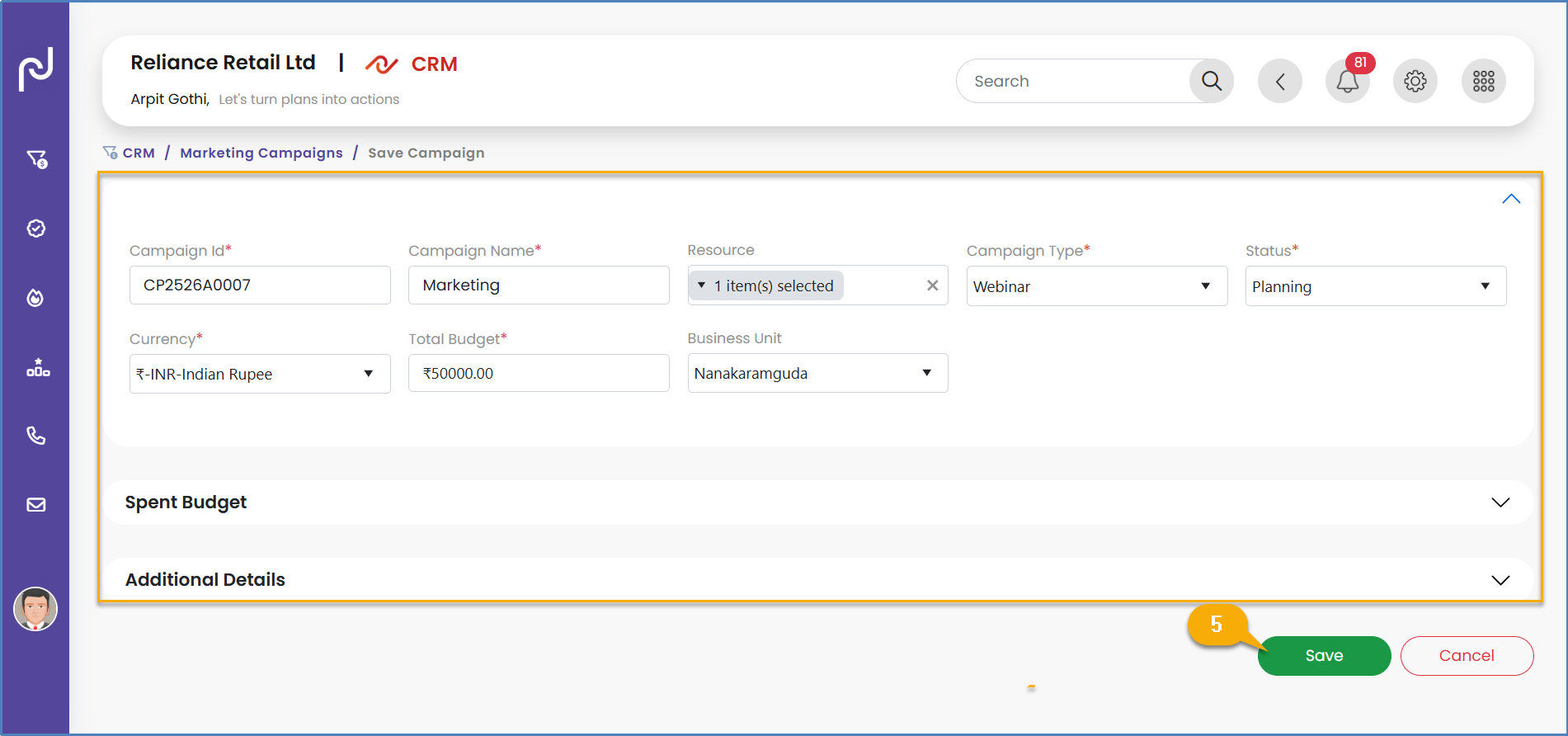
Industry Best Practices for CRM Marketing Campaign Management
Effective CRM marketing campaign management requires a strategic approach that integrates various elements for optimal results. Best practices include setting clear goals for campaigns (e.g., increasing customer satisfaction, improving sales efficiency, enhancing customer segmentation). Analysing business processes, current challenges, and future goals is crucial to determine essential CRM functionalities and maximize ROI. Prioritizing data migration and integrity by conducting data audits and cleaning before and after migration is vital to avoid transferring existing issues. Integrating the CRM with other business systems like marketing automation tools or accounting software creates a unified view of customer data and streamlines operations. Planning for continuous improvement through regular reviews of CRM practices and user feedback is essential, as CRM implementation is an ongoing journey. Leveraging CRM automation for repetitive tasks (e.g., lead follow-ups, sales forecasts, conversion tracking) saves time and reduces errors. Utilizing CRM reports and analytics to understand sales forecasts, lead source analysis, and conversion rates provides valuable insights for teams and executives. Finally, providing comprehensive training in multiple formats (live, self-paced, online knowledge base) ensures user adoption and proficiency.
Karya.cloud CRM's ability to manage marketing campaigns provides a platform for orchestrating growth initiatives. The best practices for CRM marketing campaign management highlight that the CRM serves as the central hub for integrated sales and marketing strategies. This means that effective campaign management within Karya.cloud is not an isolated function but is deeply intertwined with sales processes, data management, and analytics. For example, marketing campaigns created in Karya.cloud should be designed to feed qualified leads directly into the sales pipeline, with the CRM tracking the entire customer journey from initial marketing touchpoint to closed deal. This integration ensures that marketing efforts are directly aligned with sales objectives, and that both teams are working from the same data, leading to improved lead quality, higher conversion rates, and overall revenue growth.
Scheduling Success
The Sales Calendar in Karya.cloud CRM is a valuable tool that assists users in organizing and managing their sales activities with efficiency. It provides a clear, calendar-based view of all important events, including follow-ups, client meetings, calls, demonstrations, and task deadlines.
This functionality empowers sales teams to: meticulously track scheduled activities and prevent missing critical engagements; proactively plan their day, week, or month with enhanced visibility; coordinate effectively with team members by viewing shared events or appointments; and ultimately improve time management and increase overall productivity. By leveraging the Sales Calendar, users can maintain oversight of their sales pipeline and ensure timely follow-ups with both prospects and existing customers.
Customizing Communication
To create an email template in Karya.cloud CRM, the user navigates to the top-right corner and clicks the “Menu” icon, then selects “CRM.” In the left sidebar, the "Email Settings" section is expanded, and "Email Templates" is selected. The user then navigates to the top right corner and clicks on “Create Email Template.” The template name is entered, and the content is added to the body. If an existing template is available, it can be uploaded. Finally, the “Save” Button is clicked. These templates are designed for use in email campaigns and for system-generated emails sent to leads and deals.


To define a workflow for emails in Karya.cloud CRM, the user navigates to the top-right corner and clicks the “Menu” icon, then selects “CRM.” In the left sidebar, the "Email settings" section is expanded, and “Email workflow" is selected. The user then navigates to the bottom right corner and clicks the “+” icon. The type of workflow (lead/deal) is selected. All required fields are completed, and the 'Save' button is clicked.
To manage an existing email workflow, the same initial steps are followed up to selecting “Email workflow." The specific workflow to be updated is then selected, leading to the edit management page. To deactivate an email workflow, the toggle is simply turned off, and the update button is clicked. When a workflow is added, the system is configured to automatically send emails whenever the status or stage changes from one value to another.


Onboarding Your Information
To import data into Karya.cloud CRM, the user follows a detailed sequence of steps: first, navigate to the top-right corner of the main menu bar and click on "Menu," then select "CRM" from the options. Next, in the left sidebar, click on "Leads," and then click on "Manage Leads." The user then locates and clicks on the "Import Leads" option, which is positioned at the top-right corner of the screen. Subsequently, the "Choose File" option is clicked to browse the system and select the leads data file intended for import. After selecting the file, "Submit" is clicked to initiate the data import process. Once the data is successfully saved, the imported leads will become visible under the "Manage Leads" section.


CRM Data Import Pre-processing Best Practices
Before importing any data into a CRM, it is imperative to ensure data quality and accuracy to prevent issues like incomplete or inaccurate customer profiles, inconsistent data formats, and missing relationship connections, which can lead to missed opportunities and ineffective communication.
Key actions for data preparation include standardizing data format (e.g., consistent dates, phone numbers, addresses); removing duplicate entries by scanning the import file for obvious matches; validating email addresses and phone numbers for proper formatting and existence; and mapping required fields to ensure all mandatory CRM fields are populated.
Developing a systematic import strategy is also crucial: starting with a small test import (0-00 records) to validate the process before larger imports; documenting field mappings by creating a reference guide; planning for special cases (e.g., handling missing data, custom fields); and establishing a rollback plan to reverse the import if significant issues arise.
During execution, it is essential to back up existing CRM data; run the test import and thoroughly review results for proper field mapping and data integrity; document any issues or anomalies; and proceed with the full import only after satisfactory test results. Finally, establishing import controls involves creating import templates for future consistency; implementing validation rules for data format and completeness; establishing an import schedule to minimize system disruption; and monitoring import results regularly for quality and completeness.
Karya.cloud CRM provides a clear process for importing data. The best practices for CRM data import pre-processing highlight that data integrity is the cornerstone of CRM utility. This means that merely having an import function is insufficient, the quality of the data
before it enters the system is paramount. Without rigorous pre-processing—including standardization, de-duplication, and validation—the CRM becomes a repository of flawed information, leading to inaccurate reports, misguided strategies, and diminished ROI. This emphasizes that organizations should invest time and resources in cleaning and preparing their data before utilizing Karya.cloud's import feature, ensuring that the insights derived from the CRM are reliable and actionable.
RM Data De-duplication Strategies
CRM data de-duplication is a critical ongoing process for maintaining high data quality, which in turn improves revenue forecasts, enhances team collaboration, and ensures consistent customer outreach.
There are three primary techniques for CRM data de-duplication:
- ● Automated Deduplication: This involves setting up the CRM system to automatically detect and merge duplicates based on predefined rules (e.g., email addresses, phone numbers). These processes run continuously in the background, maintaining data cleanliness without manual intervention.
- ● Preventative Deduplication: This technique focuses on stopping duplicates before they enter the CRM database. It includes implementing validation rules or checks during data entry, which can alert users of potential duplicate data or prevent duplicate entries altogether.
- ● Automated Deduplication: This is a more manual process performed at specific times, ideal for cleaning up data after merging databases, importing older lists, or during quarterly cleanups.
Key strategies for streamlining de-duplication and achieving lasting results include: developing a clear data model that defines how data is structured and how duplicates are identified; maintaining data hygiene through periodic reviews and database cleanups; choosing the right de-duplication tools that fit specific data processing needs and integrate seamlessly with the CRM; automating the de-duplication process to continuously scan and clean bad data; and implementing regular updates to de-duplication protocols to adapt to changes in data structure and business processes. It is also crucial to set rules for data structure (e.g., what makes a contact unique) and make data hygiene a regular habit.
Karya.cloud CRM's import process notes that duplicate records will be shown, and submission disabled. This built-in check aligns with the best practices for CRM data de-duplication 0, emphasizing proactive data cleansing for uninterrupted operations. The presence of this feature underscores that preventing duplicates is not merely a reactive clean-up task but a fundamental aspect of maintaining data integrity. By identifying and preventing duplicates at the point of import, Karya.cloud helps ensure that the CRM database remains clean, accurate, and reliable. This proactive approach minimizes data clutter, prevents wasted sales and marketing efforts on redundant records, and ensures that all teams are working with a single, accurate view of the customer, which is critical for effective decision-making and efficient operations.
Gaining Performance Visibility
Karya.cloud CRM provides a diverse array of reports designed to assist users in analysing their sales and marketing data comprehensively. These reports offer flexibility, allowing users to filter the data as needed and providing the option to export the information to Excel for further analysis.
The available report types include:
- ● Deals: Provides insights related to sales opportunities.
- ● Leads: Offers data on unqualified prospects and their status.
- ● Individual targets: Shows the sales targets assigned to individual users.
- ● Organization targets: Displays targets set for the entire organization.
- ● Team targets: Presents targets assigned to specific sales teams.
- ● Deal Top Performers:Identifies the top-performing individuals or teams in terms of deals.
- ● Deals by Month: Breaks down deal performance on a monthly basis.
- ● Leads by Activity: Reports on lead engagement based on various activities.
- ● Leads by Deals: Shows the relationship between leads and converted deals.
- ● Marketing Campaigns: Provides data on the effectiveness of marketing campaigns.
- ● Deals by Stages: Tracks deals as they progress through different sales pipeline stages.
- ● Deals by Resources: Reports on deals based on the resources utilized.
- ● Deals by Revenue: Focuses on the revenue generated from deals.
- ● Sales Current Month: Offers a snapshot of sales performance for the current month.
- ● Leads by Sources: Identifies the channels or platforms from which leads originate.
- ● Leads by Industry: Categorizes leads based on their industry.
- ● Leads by Status: Shows the current stage or condition of leads in the sales process.
- ● Leads by Territory: Reports on leads based on defined geographic areas or segments.
- ● Leads by Location: Provides insights into leads based on their geographical location.
- ● Team Performance: Evaluates the overall performance of sales teams.
Access to these reports varies based on user roles: a Team Member can view only their own data; a Team Leader has the option to view both their own data and their team members' data; and a System Administrator possesses full access to view everyone's data.


CRM Reporting and Analytics for Sales and Marketing Insights
To optimize CRM usage, it is crucial to leverage CRM reports and analytics to gain actionable intelligence for both sales and marketing. Data becomes truly useful when it can be transformed into insights that inform decisions.
CRM reports and analytics can assist teams and executives in several ways: providing sales forecasts by predicting future revenue based on open deals, offering valuable insights for sales planning ; identifying which channels bring in the most valuable leads through lead source analysis, allowing marketing efforts to be focused on the most effective sources ; and showing which deals are closing the fastest through conversion rate reports, helping to understand the efficiency of the sales process.
Other benefits include monitoring pipeline health to identify patterns and bottlenecks; understanding customer behaviour by revealing demographics and preferences; optimizing marketing performance by identifying effective lead sources and measuring ROI; and saving time and resources through automated data collection and report generation. Key features of a great CRM report include custom filters for segmented data analysis, an intuitive and easy-to-understand format using charts and graphs, and the ability to complement marketing data for improved sales funnels and lead capture.
Karya.cloud CRM offers a comprehensive suite of reports, providing extensive visibility into sales and marketing performance. The best practices for CRM reporting and analytics highlight the transformative power of actionable reporting. This means that the sheer volume of reports available in Karya.cloud is a valuable asset, but its full potential is realized when users actively analyse the data to derive specific, actionable insights. For example, a "Deals by Stages" report might reveal that deals are consistently stalling at the "Proposal Sent" stage. This observation, when analysed, becomes an actionable insight: the sales team may need additional training on proposal presentation or negotiation tactics. This systematic process of reviewing, analysing, and acting upon report data ensures that Karya.cloud CRM is not just a record-keeping system but a dynamic engine for continuous improvement in sales and marketing operations.
CRM on the Go
The mobile version of Karya.cloud CRM offers several features for users, with access contingent upon the permissions granted to them. The available features include:
- ● Manage Leads: Users with "Manage Page" access can add, edit, and assign leads to their employees. Lead assignment can be based on the selected business unit, ensuring leads are allocated to appropriate teams or individuals.
- ● Manage Deals: Users with "Manage Page" access can add new deals, edit existing ones, and assign them to their team members.
- ● My Leads: Users with "My Page" access can view leads assigned to them. They can also add new leads and edit leads they have personally added.
- ● My Deals: Users with "My Page" access can view deals assigned to them. They can also create new deals and edit only the deals they have personally added.
- ● Location History: Users with "Location History" access can toggle the location tracker on or off as needed. The system records their location activity based on when the tracker is enabled or disabled.
It is important to note that when a user assigns a lead or deal and grants "Champion" access to an employee, that employee will have full access and control over that specific lead or deal. The mobile version aims to mirror the functionality available on the web, providing a consistent user experience across platforms.
CRM Benefits for Sales Productivity & Field Sales
To optimize CRM usage, it is crucial to leverage CRM reports and analytics to gain actionable intelligence for both sales and marketing. Data becomes truly useful when it can be transformed into insights that inform decisions.
CRM reports and analytics can assist teams and executives in several ways: providing sales forecasts by predicting future revenue based on open deals, offering valuable insights for sales planning ; identifying which channels bring in the most valuable leads through lead source analysis, allowing marketing efforts to be focused on the most effective sources ; and showing which deals are closing the fastest through conversion rate reports, helping to understand the efficiency of the sales process.
Other benefits include monitoring pipeline health to identify patterns and bottlenecks; understanding customer behaviour by revealing demographics and preferences; optimizing marketing performance by identifying effective lead sources and measuring ROI; and saving time and resources through automated data collection and report generation. Key features of a great CRM report include custom filters for segmented data analysis, an intuitive and easy-to-understand format using charts and graphs, and the ability to complement marketing data for improved sales funnels and lead capture.
Karya.cloud CRM offers a comprehensive suite of reports, providing extensive visibility into sales and marketing performance. The best practices for CRM reporting and analytics highlight the transformative power of actionable reporting. This means that the sheer volume of reports available in Karya.cloud is a valuable asset, but its full potential is realized when users actively analyse the data to derive specific, actionable insights. For example, a "Deals by Stages" report might reveal that deals are consistently stalling at the "Proposal Sent" stage. This observation, when analysed, becomes an actionable insight: the sales team may need additional training on proposal presentation or negotiation tactics. This systematic process of reviewing, analysing, and acting upon report data ensures that Karya.cloud CRM is not just a record-keeping system but a dynamic engine for continuous improvement in sales and marketing operations.
Conclusions & Recommendations
The Karya.cloud CRM module is designed as a comprehensive, cloud-based solution that extends beyond basic customer data management to function as a strategic operational hub for businesses. Its capabilities, ranging from detailed lead and deal management to robust reporting and mobile accessibility, position it as a critical tool for driving revenue growth and enhancing customer relationships.
The analysis reveals that while Karya.cloud provides a strong foundation of features, its true potential is unlocked through the strategic application of industry best practices. This involves:
- ● Proactive Data Management: The emphasis on data integrity, from pre-import cleansing and de-duplication to standardized formats, is paramount. Reliable data forms the bedrock for all accurate reporting, forecasting, and actionable intelligence within the CRM.
- ● Intelligent Automation: Leveraging Karya.cloud's workflow capabilities for dynamic, behavior-driven lead nurturing and sophisticated deal management can significantly accelerate sales cycles and improve conversion rates. This moves beyond simple task automation to intelligent process optimization.
- ● Strategic Alignment: The CRM acts as a central platform for aligning sales and marketing objectives, particularly through shared dashboards, integrated campaign management, and a common understanding of lead qualification and scoring. This fosters seamless collaboration and a unified go-to-market strategy.
- ● Actionable Reporting: The extensive reporting features in Karya.cloud are most impactful when data is actively transformed into actionable insights. This requires a culture of continuous analysis and adaptation, where reports inform specific strategic adjustments and resource allocation.
- ● Empowering Mobile Operations: The mobile CRM functionality is not merely a convenience but a strategic enabler for field sales teams, allowing for real-time updates and access to critical information, thereby boosting productivity and responsiveness in dynamic environments.
To maximize the return on investment from Karya.cloud CRM, organizations are advised to:
- 1. Invest in Data Governance: Establish clear protocols for data entry, regular data audits, and continuous de-duplication processes to ensure the highest quality of information within the CRM.
- 2. Customize Workflows Strategically: Design and implement automated workflows that are tailored to specific business processes and customer journeys, ensuring that they are behavior-driven and responsive to lead and deal progression.
- 3. Foster Cross-Functional Collaboration: Promote continuous dialogue and shared objectives between sales and marketing teams, utilizing the CRM as the central platform for unified strategy execution and performance monitoring.
- 4. Prioritize Actionable Analytics: Train teams to not only generate reports but also to interpret the data for actionable insights, enabling agile decision-making and continuous process improvement.
- 5. Maximize Mobile Adoption: Encourage and train field sales teams to fully leverage the mobile CRM capabilities for real-time data access, updates, and enhanced productivity.
By embracing these recommendations and using Karya.cloud CRM, organizations can transform into a powerful engine for sustained growth, operational excellence, and superior customer relationship management
Introduction
Karya.cloud CRM represents a sophisticated, cloud-based system meticulously engineered to empower businesses in managing and elevating their interactions with customers, leads, and partners. This platform serves as a centralized hub, enabling teams to efficiently store comprehensive customer information, track communication histories with precision, manage dynamic sales pipelines, automate repetitive administrative tasks, and extract critical intelligence through advanced analytics and reporting functionalities.
As a Software-as-a-Service (SaaS) solution, Karya.cloud CRM is hosted online, providing universal access from any location. This inherent accessibility makes it an optimal tool for geographically dispersed or remote teams, as well as for organizations operating across multiple physical locations. The system encompasses a broad spectrum of features, including robust contact and lead management, integrated email and activity tracking, advanced task automation capabilities, granular customer segmentation tools, and seamless integration with other essential business applications such as marketing platforms or help desks.
The strategic importance of an effective Customer Relationship Management (CRM) system for modern businesses cannot be overstated. A CRM system is fundamental for the proficient management of a sales pipeline, furnishing sales teams with indispensable tools to diligently track leads, cultivate robust customer relationships, and automate routine operational tasks. Simultaneously, it delivers detailed analytics on sales performance, offering a holistic view of the sales landscape.
Beyond its direct impact on sales, a comprehensive CRM strategy enables businesses to foster exemplary customer service across every touchpoint of the customer journey. It facilitates the meticulous tracking of leads as they progress through the sales funnel, refines and enhances marketing initiatives, systematizes sales management tactics, and clarifies inter-departmental communication, thereby fostering enhanced collaboration. Such a system significantly mitigates instances of outdated information, errors, and missed opportunities, invigorates the lead funnel to boost lead generation, and establishes Key Performance Indicators (KPIs) crucial for precise future planning and strategic initiatives. Without a well-defined CRM strategy, teams may easily lose sight of their objectives and encounter operational disarray.
The functionality of Karya.cloud CRM extends beyond a mere collection of tools; it functions as a strategic enabler. Its true value lies in its capacity to integrate and optimize entire business processes—spanning sales, marketing, and customer service—for overarching growth and efficiency. This signifies that the CRM acts as a central nervous system for all customer-facing operations, directly influencing revenue, customer satisfaction, and the overall health of the business by centralizing data for unified and coordinated action. The effective implementation of Karya.cloud CRM thus extends far beyond simply utilizing its features; it involves leveraging the platform to drive strategic alignment and operational excellence across the entire customer lifecycle.
Dashboard
The Karya.cloud CRM dashboard functions as a centralized, real-time command centre, offering a comprehensive and dynamic view of key CRM metrics and pipeline data. It visually presents critical intelligence, including overall targets, a general overview of leads, deals, closed-won percentages, total deal amounts, and generated revenue. The dashboard also highlights top performers in deals, provides a graphical representation of deals based on their stages, displays individual targets assigned to the user, identifies top-performing lead sources, and showcases top-performing territories. Additionally, it meticulously tracks campaign expenditure, offering a clear depiction of marketing investments. Equipped with intuitive visual charts and quick-access widgets, the dashboard empowers Team Leads to efficiently monitor workforce trends and make informed, data-driven decisions.
- ● Targets:All targets established by the organization are accessible to users and are determined using team data.
- ● Overview:Shows data on leads, deals, win rate, deal values, and revenue.
- ● Top Performers:This section displays all individuals who have achieved top performance in deal execution.
- ● Deals:All deals, categorized by stage, can be displayed in a graphical format.
- ● Individual Targets:All user-assigned targets are presented on the dashboard, accompanied by a graphical summary for comprehensive review.
- ● Leading sources of high-performing leads:These are the sources or channels that generate the highest number of quality leads — the ones most likely to convert into customers.
- ● Top performing Territories:These are the regions or areas that have shown the best sales performance based on key metrics such as the number of deals closed, revenue generated or lead conversion rates.
- ● Campaign Spent:Campaign spent refers to the total amount of money used for running a specific marketing or sales campaign. It includes costs such as ad spending, promotional activities, platform fees, and any other related expenses.
A CRM dashboard within Karya.cloud functions not merely as a reporting interface but as a dynamic, real-time strategic instrument. When consistently populated with clean and accurate data, it facilitates agile responses to evolving market conditions and internal performance challenges, fostering proactive management. The dashboard's inherent power lies in its capacity to translate complex raw data into clear, actionable intelligence, guiding where to strategically invest time, resources, and effort for maximum return on investment. For instance, Karya.cloud's dashboard explicitly identifies "top performing lead sources" and "top performing territories". This capability, when combined with best practices, allows for the identification of high-performing areas, which then informs strategic decisions such as allocating more marketing budget to a particular channel or refining targeting efforts. This transforms raw data into direct directives for sales and marketing teams.
A consolidated table can concisely summarize the critical link between each dashboard metric and its actionable purpose, serving as a quick-reference guide for users to immediately grasp the strategic utility of each component.
| Metric Name | Description | Purpose / Actionable Intelligence |
| Targets | Users can view all targets set by the organization, based on team data. | Provides a clear understanding of organizational objectives and team-based goals, enabling strategic alignment and performance monitoring. |
| Overview | Presents data on leads, deals, closed-won percentage, deal amounts, and revenue generated. | Offers a high-level summary of sales pipeline health, allowing for quick assessment of overall business performance and identification of areas requiring attention. |
| Top Performers | Displays top performers in deals. | Facilitates performance evaluation, enabling managers to identify, support, coach, and reward high-achieving team members, and to learn from successful strategies. |
| Deals by Stages | Shows all deals based on their current stages in a graphical presentation. | Visualizes pipeline progression, helping identify bottlenecks, predict future revenue, and ensure deals are moving efficiently through the sales funnel. |
| Individual Targets | All targets assigned to the user are displayed with a graphical overview. | Provides individual accountability and motivation, allowing sales professionals to track their progress against personal goals and manage their workload effectively. |
| Top Performing Lead Sources | Identifies sources or channels generating the highest number of quality leads most likely to convert. | Guides marketing budget allocation and campaign optimization by highlighting the most effective lead generation channels, ensuring investment in high-ROI activities. |
| Top Performing Territories | Identifies regions or areas with the best sales performance based on key metrics. | Informs sales territory optimization, resource allocation, and targeted sales strategies by pinpointing geographical areas with high conversion rates or revenue generation. |
| Campaign Spent | Refers to the total amount of money used for running a specific marketing or sales campaign. | Enables the evaluation of marketing and sales campaign effectiveness against expenditure, supporting data-driven decisions on future investment and budget optimization. |
| Sales Cycle Length | The average time it takes to convert a lead into a closed deal. | Identifies efficiencies or inefficiencies in the sales process, allowing for targeted interventions to shorten conversion times and improve sales velocity. |
| Win/Loss Ratios | The percentage of deals won versus lost. | Provides critical feedback on sales effectiveness, helping to refine sales strategies, identify common reasons for losses, and improve overall closing rates. |
Leads
A lead is defined as an unqualified prospect—an individual or organization that has expressed initial interest in a product or service but has not yet undergone full vetting or nurturing. It represents a "first touch" point within the sales funnel, where basic contact information is known, but the potential for conversion into a paying customer is still being assessed.
To add a lead in Karya.cloud CRM, the process involves a few straightforward steps:
- 1. Navigate to the CRM section from the Main Menu bar located in the top right corner of the interface.
- 2. Next, from the left sidebar, select "Leads." A dropdown menu will appear, from which "My/Manage Leads" should be chosen.
- 3. Finally, locate and click the "add" button to initiate the creation of a new lead within Karya.cloud CRM.
Karya.cloud CRM distinguishes between "My Pages" and "Manage Pages" to control user access and data visibility for leads and deals. "My Pages" are exclusively accessible to individual employees or team members. Users operating within "My Pages" can view data they have personally entered or data pertaining to leads or deals that have been directly assigned to them.
In contrast, "Manage Pages" are designed for and accessible by team leads. These users possess the capability to view not only their own data but also the data submitted by their team members. To effectively access and manage team members' leads, it is imperative that the team lead has been granted appropriate team lead permissions, which are configured during the team management setup.
Within the context of leads, "status" refers to the current stage or condition of a lead as it progresses through the sales or conversion process. This serves as a critical tool for tracking a lead's journey from initial contact to eventual customer conversion. Karya.cloud CRM provides robust flexibility, allowing businesses to create custom lead statuses. This customization enables organizations to precisely tailor lead progression stages to align with their unique sales processes and internal terminology.
To create a custom status for leads in Karya.cloud CRM,
- 1. The user must navigate to the CRM section from the Main Menu bar at the top right.
- 2. From the left sidebar, "Leads" is selected,
- 3. Followed by "Manage status" from the dropdown menu.
- 4. The process concludes by clicking the "add" button to define and create the new custom status.
A lead status workflow is a structured framework that precisely defines how a lead’s status changes over time. These changes are typically triggered by specific actions undertaken by sales or marketing teams, or by the lead itself (e.g., responding to an email, booking a demonstration, or engaging with content). To establish a status workflow for leads in Karya.cloud CRM, users again start from the CRM section in the Main Menu, then select "Leads," and subsequently "Manage workflow" from the dropdown. The final step involves assigning the corresponding sequence of values that should be displayed in the dropdown for each status, based on the previously defined statuses. For example, if a lead is initially created with the status "New," the system must be configured to appropriately display options for transitioning the status from "New" to "In Progress," and so forth.
Karya.cloud's capability to create custom lead statuses and workflows represents a foundational feature. The broader understanding of CRM functionality highlights that such workflows can automate critical processes like lead scoring, lead assignment, and lead qualification. This establishes a direct causal link: Karya.cloud's customization features enable the operationalization of these automated processes. By automating status changes (as implied by email workflows, which often trigger on status changes) and subsequent actions (such as assigning leads to sales representatives or initiating nurturing sequences), businesses can significantly enhance sales velocity and efficiency. This proactive approach actively prevents leads from becoming stagnant or being overlooked, thereby streamlining the sales cycle. The strategic implementation of custom workflows within Karya.cloud CRM is not merely about organizing lead progression; it is about creating an automated, intelligent system that minimizes manual effort, ensures timely follow-ups, and ultimately accelerates the entire sales cycle, leading to higher conversion rates.
Territories: "Territories" in Karya.cloud CRM refer to defined segments or geographic areas that are strategically assigned to sales or service teams. The fundamental purpose of establishing territories is to manage customer relationships, leads, and opportunities with greater efficiency and effectiveness. To create territories for leads in Karya.cloud CRM, users navigate to the CRM section from the Main Menu, select "Leads," then "Manage territories" from the dropdown, and finally click the "add" button to define a new territory.
Lead Source:A "Lead Source" defines the specific method, marketing campaign, or platform that initially brought a lead into the CRM system. Tracking lead sources is essential for businesses to accurately ascertain the origin of their leads, which in turn allows them to assess the effectiveness and return on investment (ROI) of various marketing and sales initiatives. The process for creating a lead source in Karya.cloud CRM mirrors that of territories: access CRM from the Main Menu, select "Leads," then "Manage Sources" from the dropdown, and click the "add" button to establish a new source.
Lead Item Settings: "Item Settings in Leads" typically refer to configurable fields, dropdowns, or properties directly associated with a lead record. These may include specifying which products, services, or categories are relevant to that particular lead. Such item settings can also be utilized on the deal edit page to associate products or services with a specific deal.
Lead Custom Fields: Karya.cloud CRM offers the capability to create custom fields for leads. These custom fields enable the capture of additional, unique information that may not be included in the default lead fields provided by the system. This feature is invaluable for tailoring the lead form to align precisely with a business's unique processes, specific product offerings, or distinct customer types. To create custom fields for leads, users navigate from the main menu bar to CRM, then to "Leads," and select "custom fields" from the dropdown. The final step involves enabling the required fields and naming them appropriately to suit specific business requirements.
Effective lead qualification is paramount for optimizing sales efforts and ensuring that resources are directed towards the most promising opportunities. Several industry-standard methodologies guide this process:
- ● BANT (Budget, Authority, Need, Timeline): Developed by IBM in the 0s, BANT is a straightforward methodology that prioritizes four key considerations for rapid sales qualification. Its primary strength lies in its simplicity and speed in evaluating prospects, allowing sales teams to quickly qualify or disqualify leads. However, its limited scope may not provide deep insights into a prospect's underlying pain points and is often less suitable for complex BB sales scenarios that necessitate a more consultative approach.
- ● SPIN (Situation, Problem, Implication, Need-payoff):This methodology, rooted in Neil Rackham's research, is highly customer-centric. It focuses on asking open-ended questions to uncover a prospect's pain points and then systematically demonstrating how the product or service can effectively address those needs. Its strengths include fostering trust and enabling the tailoring of solutions to specific customer requirements. Nevertheless, it can be time-consuming and demands highly skilled sales representatives to execute effectively, making it less ideal for transactional sales with short cycles.
- ● MEDDIC (Metrics, Economic buyer, Decision criteria, Decision process, Identify pain, Champion):MEDDIC provides a comprehensive and rigorous framework for qualifying opportunities by focusing on six key factors. It is highly customer-centric, compelling sales representatives to thoroughly understand the prospect's pain points and decision-making processes. This approach can build significant trust and credibility. However, its rigidity and complexity can pose a disadvantage in fast-paced sales environments, often necessitating more extensive sales training for effective implementation.
Karya.cloud CRM provides the flexibility to manage lead statuses and workflows. The distinct lead qualification methodologies (BANT, SPIN, MEDDIC) each possess specific strengths and weaknesses tailored to different sales contexts, ranging from transactional to complex BB sales. This implies that businesses should not merely utilize Karya.cloud's lead features generically but must strategically select and then implement a specific qualification framework (or a hybrid approach) within Karya.cloud's customizable lead statuses and workflows. For instance, an organization with short, high-volume sales cycles might configure Karya.cloud's lead statuses to reflect a simplified BANT approach. Conversely, a company engaged in complex enterprise sales would design more detailed stages aligned with SPIN or MEDDIC to capture deeper insights into customer needs and organizational dynamics. This strategic choice directly influences the quality of leads passed to sales and ultimately impacts conversion rates. The inherent flexibility of Karya.cloud CRM's customization features should be deliberately leveraged to operationalize a chosen lead qualification methodology. This ensures that the sales process is optimized for both efficiency and effectiveness, directly impacting the quality of leads entering the sales pipeline and improving overall conversion rates by focusing sales efforts on the most promising opportunities.
A comparative table of these methodologies offers a concise, side-by-side view that highlights their key distinctions and appropriate applications, facilitating a strategic choice that can then be accurately configured within Karya.cloud's customizable lead stages, ensuring consistency and effectiveness in lead qualification.
| Methodology | Acronym Meaning | Primary Focus | Strengths | Weaknesses | Ideal Use Case |
| BANT | Budget, Authority, Need, Timeline | Rapid qualification based on four key criteria | Simple, quick for evaluating prospects, efficient qualification/disqualification | Limited insight into pain points, less adaptable to complex sales, accuracy issues early in cycle | Short, transactional sales cycles where quick evaluation is prioritized |
|---|---|---|---|---|---|
| SPIN | Situation, Problem, Implication, Need-payoff | Uncovering prospect pain points through questioning and demonstrating solution value | Highly customer-centric, builds trust, enables tailored solutions, consultative approach | Time-consuming, requires skilled reps, may not cover all sales process aspects (e.g., objections) | Solution-based selling, complex sales where understanding deep needs is critical |
| MEDDIC | Metrics, Economic buyer, Decision criteria, Decision process, Identify pain, Champion | Rigorous qualification focusing on six key factors for comprehensive opportunity assessment | Comprehensive framework, forces focus on prospect's decision process, customer-centric | Rigid, complex ( steps), requires significant training, can slow down fast-paced sales | High-value, complex enterprise sales with multiple stakeholders |
Automated Lead Nurturing Strategies
Automated lead nurturing serves as a powerful instrument for cultivating relationships with potential customers by delivering personalized and timely content throughout their unique buyer's journey. This process involves the automation of lead nurturing practices, such as sending follow-up emails, providing relevant resources based on specific user behaviour (e.g., abandoned shopping cart emails, event reminder emails, follow-up emails after a guide download, or anniversary emails for existing clients). Automated lead nurturing proves particularly valuable given that modern buyer journeys are rarely linear, audience distractions are prevalent, and in business-to-business (BB) contexts, purchasing decisions often involve multiple stakeholders.
Key advantages of automated lead nurturing include: the automatic qualification, segmentation, and nurturing of leads; the delivery of appropriate content at the opportune moment through behaviour tracking; the creation of multiple paths to purchase via various lead nurturing campaigns; the assurance of consistent nurturing without requiring extensive manual effort; and the provision of automated reporting for performance intelligence.
Karya.cloud CRM allows for the creation of email workflows and custom fields for leads, alongside dynamic mailing lists. Automated lead nurturing strategies emphasize delivering content based on specific user behaviour and adapting to the non-linear nature of modern buyer journeys. This highlights a critical application for Karya.cloud's automation capabilities: they should be configured not merely for sequential email drips but for dynamic, responsive actions triggered by lead interactions. For example, a lead visiting a pricing page could trigger a specific sales email, or downloading a whitepaper could move them into a new, more engaged segment. This represents a shift from simple automation to intelligent, adaptive nurturing. By leveraging Karya.cloud CRM's workflow and segmentation features for behavioural-driven nurturing, businesses can maximize engagement and conversion rates. This ensures that relevant messages are delivered at precisely the opportune moment, which is crucial for navigating today's increasingly complex and individualized buyer landscapes.
Lead Scoring Methodologies
Lead scoring is a strategic process employed by sales and marketing teams to rank prospects by assigning numerical scores based on their potential to convert into customers. This prioritization aids in tailoring outreach strategies and enhancing conversion rates by categorizing leads as hot, warm, or cold.
The general approach to lead scoring involves several steps: first, analysing the current customer base to identify common characteristics and behaviours that historically led to conversions; next, determining which attributes and behaviours most frequently result in a purchase to form the scoring criteria; subsequently, allocating points to each criterion based on its relative importance (with higher points for high-value actions); then, developing a model that incorporates both demographic/firmographic and behavioural factors (e.g., a 0-00 point scale with defined ranges for hot, warm, cold leads); utilizing a CRM or marketing automation tool to automate the scoring process and segment leads; developing tailored engagement and nurturing strategies for each category; and finally, regularly reviewing and adjusting the model to ensure its continued effectiveness.
Key best practices for lead scoring include: ensuring data accuracy, completeness, and up-to-date information; fostering regular communication and collaboration between sales and marketing teams to define criteria and align goals; periodically reviewing and updating lead scoring models to reflect market changes and customer behavior; tailoring criteria to align with detailed buyer personas; and establishing feedback mechanisms from both sales and marketing teams for continuous improvement.
Karya.cloud CRM provides functionalities for custom fields and lead status management. Lead scoring 0 is explicitly highlighted as a best practice that necessitates "regular communication and collaboration between sales and marketing teams to define lead scoring criteria, share insights, and align goals." This illustrates that lead scoring is not merely a technical function for ranking leads but a critical organizational alignment tool. It ensures that both sales and marketing teams share a common understanding and agreement on what constitutes a "qualified" or "hot" lead, thereby reducing friction during lead handoffs and improving the efficiency of the entire sales funnel. Implementing a robust lead scoring system within Karya.cloud CRM, by leveraging its customization features, directly contributes to a unified Go-to-Market (GTM) strategy. This ensures that sales efforts are consistently focused on high-potential leads identified by marketing, optimizing resource allocation and significantly boosting conversion rates across the organization.
Lead Routing Rules and Automation
Effective lead routing is crucial for optimizing sales efficiency and ensuring timely engagement with prospects. Key best practices for effective lead routing include: clearly defining and documenting the lead routing process (covering lead sources, sales team structure, lead data, routing rules, technology, and expected action steps); qualifying inbound leads early and frequently to ensure sales team buy-in and prevent wasted effort; segmenting and personalizing lead journeys in a meaningful way to enhance relevance; balancing the speed of response with the accuracy of lead assignment; strategically utilizing Artificial Intelligence (AI) only where it genuinely adds value (e.g., predictive scoring, data summarization, real-time enrichment); and avoiding overly strict rules that might cause valuable outliers to be overlooked.
AI can significantly enhance lead routing through several applications: predictive lead scoring, which analyzes existing customers to score new leads based on their similarity; data aggregation and summarization, which assists sales teams in qualifying leads faster and personalizing outreach; and AI-powered data enrichment, which continuously updates CRM with lead attributes in real-time.
Karya.cloud CRM facilitates lead assignment (implied by the "My/Manage Leads" distinction and the ability to assign leads in the mobile version). Lead routing best practices introduce a critical trade-off: balancing "speed and accuracy." While rapid response times are crucial for lead conversion, routing a lead to the incorrect sales representative (e.g., one lacking specific territory knowledge or product expertise) can be detrimental, potentially reducing the chances of booking a qualified meeting. This indicates that Karya.cloud's lead assignment features should be configured with sophisticated rules that consider not just immediate availability but also lead attributes (such as territory, industry, and potential value) and the specific expertise of the sales representative. This might involve leveraging AI for smarter, more nuanced routing decisions. Effective lead routing in Karya.cloud CRM extends beyond simple round-robin assignment. It demands an intelligent, data-driven distribution strategy that optimizes for conversion by precisely matching the right lead with the most suitable sales resource. This approach, even if it entails a slight delay for improved quality, ultimately leads to more successful engagements and higher conversion rates.
Optimizing Lead Source Tracking
Lead source tracking provides essential intelligence to identify which marketing channels, campaigns, and touchpoints are effectively generating high-quality leads and which are inefficiently consuming budget. This tracking is fundamental for building effective attribution models and optimizing future marketing investments by connecting each lead to its originating source.
Key best practices for lead source tracking include: standardizing the UTM (Urchin Tracking Module) structure across all campaigns for consistent naming conventions; tracking both first-touch and multi-touch sources to avoid relying solely on last-click attribution, which often provides an incomplete picture of the customer journey; utilizing first-party tracking and cookieless options to comply with privacy regulations and ensure functional tracking despite cookie blocking; enriching and segmenting leads based on source quality to build marketing strategies around lead quality rather than merely quantity; and aligning tracking with the broader growth stack (including analytics, product, and marketing automation tools) to ensure consistent data and prevent siloed intelligence.
Karya.cloud's dashboard displays "top performing lead sources”, and the system allows for the creation of lead sources. However, lead source tracking best practices explicitly advise against relying solely on last-click attribution. Instead, they advocate for understanding the full customer journey by tracking "first-touch and multi-touch sources." This indicates that while Karya.cloud provides foundational reporting on lead sources, a deeper, more sophisticated analysis—potentially requiring integration with other analytics tools (as suggested by "align your tracking with your growth stack”)—is necessary to truly comprehend the complex path to conversion and attribute value across all contributing touchpoints. To fully optimize marketing spend and accurately assess ROI within Karya.cloud CRM, businesses need to evolve beyond simple lead source reporting. This involves embracing sophisticated multi-touch attribution models, ensuring all contributing channels are recognized through standardized tracking (e.g., UTMs), thereby providing a more holistic and accurate view of marketing effectiveness.
Effective sales territory management is a critical component of optimizing sales performance and involves four proven best practices:
1.Building a Strong Data Foundation: This necessitates gathering and integrating current and historical data from various organizational systems. This includes data from the CRM (for deal velocity and win rates), financial systems (for customer lifetime value), and sales enablement tools (for representative performance). The objective is to construct a comprehensive representation of market opportunity. Regular updates to this data are essential to ensure balanced territory assignments.
2.Balancing Workloads: Optimal planning extends beyond merely counting accounts; it acknowledges that diverse types of deals demand different resources (e.g., complex enterprise deals versus numerous small to medium business (SMB) prospects). This involves integrating data-driven insights with human judgment, considering factors such as travel time, geographic spread, deal complexity, sales cycle length, account penetration, growth potential, technical expertise required, and the availability of support teams.
3.Using Territory-Specific Metrics: Instead of relying solely on total revenue to gauge territory performance, it is advisable to utilize a more sophisticated set of Key Performance Indicators (KPIs). These include Revenue Per Account (for assessing risk exposure and growth potential), Sales Velocity (the pace of money flow through the pipeline), Cost to Serve (all resources expended to generate revenue), Market Penetration (captured market share), and Sales Productivity Metrics (the efficiency with which representatives convert their time into revenue).
4.Promoting Cross-Functional Collaboration: Effective territory management requires intelligence from various departments, not exclusively sales. This includes input from marketing (to identify which segments engage most effectively), customer success (to understand which accounts require the most post-sale support or are most likely to expand), and finance (to pinpoint profitability patterns across different customer types and regions). Modern tools can integrate these diverse insights to provide a holistic view.
Karya.cloud's capability to define sales territories provides the structural foundation for effective territory management. The discussion of best practices in sales territory management highlights the necessity of a holistic approach that extends beyond simple geographic segmentation. This involves integrating data from various organizational functions and balancing workloads based on deal complexity and resource availability. This broader perspective indicates that Karya.cloud's territory feature, while fundamental, is most effective when combined with a strategic approach to resource optimization. This means considering not just where leads are located, but also the specific skills of sales representatives, the complexity of deals in a given area, and the support available. The goal is to ensure that sales resources are allocated optimally, preventing burnout and maximizing overall productivity and revenue generation. Territory management within Karya.cloud CRM should be viewed as a comprehensive resource optimization strategy, ensuring that sales efforts are not only geographically targeted but also strategically aligned with available resources and market opportunities.
Deals
A deal, often referred to as an "opportunity," signifies a qualified sales opportunity that a sales team is actively pursuing. It represents a potential sale that has progressed further down the sales funnel than a mere lead, indicating that a genuine need, budget, and timeline have been identified.
To add a deal in Karya.cloud CRM, the user initiates the process by navigating to the CRM section from the Main Menu bar located in the top right corner. Subsequently, from the left menu bar, "Deals" is selected. From the resulting dropdown menu, "My/Manage Deals" is chosen. The final step involves clicking the "add" button to create a new deal.
A deal’s lifecycle refers to the distinct stages a sales opportunity progresses through—from its initial creation until it is either successfully won or definitively lost. In some comprehensive CRM implementations, this lifecycle may extend to post-sale stages such as renewal or upsell opportunities. The establishment of well-defined lifecycle stages offers several strategic advantages for a sales team: it enables clear visualization of progress, allowing team members to know precisely where each opportunity stands; it facilitates the prioritization of activities, directing effort towards deals that are most ripe for closure; it aids in accurate revenue forecasting by projecting likely outcomes based on the number of deals in each stage; and it supports the automation of workflows, triggering reminders, tasks, or communications at appropriate points within each stage.
"Stages in Deals," also known as Deal Stages or Pipeline Stages, represent the sequential progression steps a potential sale undergoes from its inception to its closure. Each stage precisely defines a point in the sales process, assisting teams in tracking the current status of a deal and identifying the necessary actions required to advance it. Karya.cloud CRM offers the capability to create custom stages for deals, allowing businesses to tailor their sales pipeline to reflect their unique processes. To create a stage for deals in Karya.cloud CRM, users navigate from the main menu bar to CRM, then to "Deals," and select "Manage stages" from the dropdown. The process concludes by clicking the "add" button to define the new stage.
A deal workflow is a structured process designed to assist sales teams in consistently managing, tracking, and moving deals through various pipeline stages—from creation to closure. This process often incorporates automation and defined logic to streamline operations. To create a deal workflow in Karya.cloud CRM, users navigate from the main menu bar to CRM, then to "Deals," and select "workflow settings" from the dropdown. The final step involves selecting the appropriate lifecycle name to associate with the workflow. The system automatically sends emails whenever the status or stage changes from one value to another, provided a workflow is added and configured to do so.
Item Settings:"Item Settings in Deals" typically refers to configurable fields, dropdowns, or properties directly related to a deal record. These settings might include specifying the products, services, or categories that are associated with a particular deal. Such item settings are utilized on the deal edit page to accurately add products or services against the deal.
Deal Custom Fields:Karya.cloud CRM allows for the creation of custom fields for deals. These custom fields enable the capture of additional information not included in the default deal fields provided by the CRM. They are instrumental in tailoring the deal form to align precisely with a business's unique processes, specific products, or distinct customer types. To create custom fields for a deal in Karya.cloud CRM, users navigate from the main menu bar to CRM, then to "Deals," and select "custom fields" from the dropdown. The process concludes by enabling the required fields and naming them accordingly to suit specific business needs.
Effective sales pipeline management is crucial for maintaining a consistent flow of deals and ensuring sustainable growth. It enables sales teams to track prospects, prioritize leads, and efficiently advance opportunities through each stage of the sales process. Proper pipeline management ensures that no leads are overlooked, directly impacting revenue and sales performance.
The initial step in effective sales pipeline management involves defining clear and distinct pipeline stages. While every company's sales process is unique, universal stages typically apply, such as lead generation, qualification, proposal, negotiation, and closing. Each stage must be meticulously defined and standardized across the sales team to ensure consistency. This clarity helps salespeople understand precisely where a lead or prospect stands in the sales cycle and what actions are required next. It also simplifies the analysis of pipeline performance and improves revenue forecasting. For example, a software company might segment its pipeline into "Initial Discovery," "Product Demo," "Needs Analysis," "Proposal Sent," and "Contract Negotiation." This clear segmentation allows the sales team to know when to advance a prospect and helps managers track the average time spent in each phase, thereby optimizing the overall process.
A sales pipeline is dynamic, changing daily as new leads enter and existing opportunities progress through various stages. Consequently, regular reviews and updates are essential to ensure data accuracy and identify any bottlenecks or stalled opportunities. Sales managers should encourage frequent updates, including the removal of unqualified leads and the addition of new opportunities. Frequent reviews help pinpoint weak spots in the sales process, allowing for timely adjustments, follow-ups, or reprioritization of efforts. This proactive management prevents the pipeline from becoming cluttered with outdated or irrelevant opportunities, ensuring a focused approach.
Karya.cloud CRM's ability to create custom deal stages and workflows provides the necessary tools for defining a sales pipeline. However, the best practices for sales pipeline management emphasize that the pipeline is a dynamic system requiring constant refinement. This means that merely setting up stages is insufficient; continuous monitoring, regular reviews, and proactive adjustments are essential. For instance, if a deal consistently stalls at a particular stage, it indicates a bottleneck that requires immediate attention and process refinement. This constant adaptation, driven by data from Karya.cloud's reporting features, ensures that the sales process remains agile and responsive to market conditions and internal performance. The sales pipeline within Karya.cloud CRM should be treated as a living, evolving system that demands continuous attention and optimization. This approach ensures that the sales process remains efficient, responsive, and ultimately more effective in converting opportunities into revenue.
Modern Customer Relationship Management (CRM) tools significantly enhance sales forecasting accuracy by transforming it from intuition-based guesswork into a data-driven science. This is achieved through a combination of data analytics, Artificial Intelligence (AI), and intuitive reporting, offering unparalleled intelligence and precision.
The shift from subjective methods to a more objective, data-oriented approach is facilitated by CRM systems that collect and centralize vast amounts of data related to sales activities, customer interactions, and market trends. This centralization provides a comprehensive view of sales activities, customer interactions, and market trends, enabling businesses to forecast sales with greater accuracy and confidence.
Key features of CRM tools that contribute to forecasting include: robust data analytics capabilities for processing and interpreting large volumes of sales data, which helps identify patterns and trends crucial for future sales predictions; predictive analytics, a critical feature utilizing AI and machine learning algorithms to forecast future sales based on historical data and current market trends; and strong integration capabilities, allowing CRM tools to incorporate external data sources such as economic indicators, market trends, and competitive analysis. This provides a more comprehensive view for accurate sales forecasting, ensuring forecasts are data-driven and contextually aware.
Advanced techniques in sales forecasting using CRM include: predictive analytics and machine learning, which go beyond traditional predictions by continuously learning from new data, providing dynamic, real-time sales forecasts aligned with the changing business environment; and integrating market trends and external factors, which offers a holistic market view by incorporating external data sources like economic indicators and competitor activities. This ensures forecasts are contextually aware and adaptable to external factors, providing a competitive edge.
Karya.cloud CRM's ability to provide reports on deals, individual targets, organization targets, and team targets lays the groundwork for sales forecasting. The best practices in sales forecasting highlight that modern CRM tools act as a predictive engine, moving beyond simple reporting to leverage AI and machine learning for more accurate and dynamic forecasts. This means that Karya.cloud's reporting features, when combined with advanced analytical techniques, can transform historical sales data and current pipeline information into forward-looking predictions. This capability allows businesses to proactively adjust strategies, allocate resources more effectively, and respond swiftly to market shifts. The CRM, therefore, becomes a strategic asset for anticipating future sales performance rather than merely reporting past results.
CRM workflow automation offers significant advantages for managing sales deals, streamlining processes, and enhancing efficiency. Several examples of such automation can be applied to sales deals.
Key best practices for CRM workflow automation for sales deals include: automating deal management workflows to oversee and track potential deals throughout the sales pipeline, from lead generation to deal closure, often using conditional routing and automatic task assignment; automating lead scoring workflows to assign values to leads and notify sales teams of high-potential prospects; automating lead and contact generation workflows to reduce manual data entry and auto-create records from inquiries; automating lead assignment workflows to ensure accountability and distribute new opportunities based on detailed "if-then" conditions (e.g., lead source, region, sales representative's online status); automating lead qualification workflows to identify the best leads with the highest conversion probability using a point system based on traits and engagement; automating customer lifecycle management workflows to manage the entire customer relationship beyond just deal closure; and automating account management workflows to alert teams about expiring contracts or renewals.
General best practices for creating CRM workflows include: determining which processes are suitable for automation (typically tasks pertinent early in the sales funnel); thoroughly testing the automation process; involving sales and marketing teams to gain insights into which workflows are beneficial or hindering; following basic setup steps (naming, assigning, setting triggers and actions, saving, and activating); regularly running and testing workflows to evaluate effectiveness; and keeping teams informed about any adjustments.
Karya.cloud CRM's capacity to create deal workflows provides the foundation for automating sales processes. The best practices for CRM workflow automation in sales deals reveal that this automation extends far beyond simple task management. It encompasses sophisticated conditional routing, automatic lead scoring, and dynamic lead assignment, transforming the sales process into an intelligent, self-optimizing system. For example, a deal workflow in Karya.cloud could be configured to automatically assign a deal to a specific sales representative based on its value or industry and then trigger a series of automated follow-up emails or tasks if the deal remains stagnant for a defined period. This level of automation significantly reduces manual oversight, minimizes human error, and ensures that every deal receives timely and appropriate attention, thereby accelerating the sales cycle and improving overall conversion rates.
Action Items are specific tasks or follow-ups that require completion by an individual or a team. In a sales context, these are tasks assigned to sales representatives with the explicit purpose of advancing deals. Examples include making a follow-up call, sending a proposal, scheduling a meeting, or updating the status of a deal.
Action Items offer several benefits for sales teams: they enhance task clarity, ensuring each salesperson knows precisely what needs to be done and by when, thereby reducing confusion or missed responsibilities. They boost productivity by keeping the team focused on high-priority activities that propel deals forward, preventing time wastage on non-essential work. They strengthen follow-ups, ensuring timely engagement with leads or clients, which is critical for successful sales closures. Action Items also enhance team collaboration, as managers can assign, track, and review team members’ tasks, simplifying work distribution and maintaining alignment. Furthermore, they improve CRM and data accuracy; when action items are linked to CRM updates (such as deal stages or client notes), data remains current and useful. Finally, they contribute to better forecasting and reporting, as knowledge of pending tasks assists managers in forecasting pipeline movement and expected closures. Notably, action items added under Leads and Deals activities within Karya.cloud CRM automatically appear on the dedicated Action Items page.
Sales task management within a CRM system involves several key strategies to ensure efficiency, transparency, and continuous improvement within a sales team. These include establishing shared documents where each stage of the sales process is documented and stored in a common, accessible folder for all sales team members, which ensures consistent access to information and alignment on project details. Setting clear standards is vital, especially for managing recurring tasks, requiring benchmarks against which progress can be measured. Communication is paramount to ensure all project stakeholders are fully engaged, maintaining transparency throughout the process and sharing all relevant information. Accurate scheduling is critical, necessitating input from all involved, particularly those with technical expertise, to create realistic timelines and avoid delays. Finally, comprehensive training is essential to ensure the team is proficient in all platforms (desktop, mobile) and understands new processes and software, enabling effective utilization of task management tools and adherence to best practices.
Sales Time Management Strategies
Effective sales time management is crucial for maximizing productivity and achieving sales targets. Key strategies include preparing for 0 minutes daily to plan the sales strategy and space out tasks, which helps maintain organization and focus. Scheduling time blocks is essential, involving allocating specific hours to different tasks based on peak productivity periods and individual strengths. Investing in sales technology, particularly the best CRM and sales engagement tools, significantly reduces manual activities and drives consistency. Utilizing keyboard shortcuts can save precious time by performing actions quickly. Other important tips include prioritizing tasks (e.g., using the Eisenhower Matrix), using time blocking for various activities (prospecting, follow-ups, admin), leveraging technology for automation and insights, setting realistic goals, avoiding multitasking, and practicing self-care.
Karya.cloud CRM's Action Items feature provides the foundational capability for managing sales tasks. The best practices for sales time management highlight that simply listing tasks is insufficient; strategic time allocation is critical for sales professionals. This involves not only prioritizing tasks (which Karya.cloud allows through its customizable priorities for leads and deals) but also blocking out time for specific activities, leveraging automation for routine tasks, and continuously refining personal workflows. For example, a sales professional might use Karya.cloud's Action Items to create a daily to-do list, then dedicate specific time blocks to "high-priority follow-ups" identified within the CRM, ensuring that critical activities receive focused attention. This strategic approach transforms Karya.cloud's task management features into a powerful tool for optimizing individual sales productivity.
Actionable Insights from CRM Data
A CRM report functions as an analytics tool integrated within a customer relationship management system, providing users with data and intelligence regarding their customers, activities, sales, and performance. It frequently employs visual elements such as charts and graphs to convert raw CRM data into digestible and actionable intelligence. These reports summarize a business's or organization's performance over a specified period and highlight opportunities that can be leveraged to drive growth and sales.
CRM reports enable users to drill down and filter data in various ways to derive actionable intelligence necessary for data-driven decisions. They facilitate the analysis of several business Key Performance Indicators (KPIs) and metrics, including individual representative and team performance, deal status, revenue forecasts, and progress towards sales goals. Business managers and executives can make pivotal decisions based on information derived from CRM reports.
To obtain actionable intelligence from CRM data, a comprehensive approach is required. This involves analyzing data from multiple sources (including CRM, marketing automation, and loyalty platforms) through various lenses such as time period, customer demographics, product interest, and sales stage. Creating unified customer profiles, which combine customer information into a single record using a unique identifier like an email address, helps in segmenting customers and understanding their typical behavior. Gathering historical data is crucial for identifying long-term trends and distinguishing genuine patterns from noise. Combining data from different channels and stages of the customer journey provides a holistic view of customer interactions, enabling better coordination and personalized messaging.
The benefits of utilizing actionable intelligence for sales teams include personalized customer experience through tailored approaches based on customer preferences and pain points; enhanced decision-making by identifying top-performing products or regions; increased efficiency through process refinement and resource reallocation; competitive advantage by anticipating customer needs; and attention to detail by identifying minor issues or opportunities. Predictive analytics and real-time data analysis are emerging trends that further enhance the utility of CRM data for sales teams
Karya.cloud CRM's reporting capabilities provide a wealth of data points. The discussion on actionable intelligence highlights that the true value of this data lies in its transformation from raw information into strategic sales directives. This means that merely viewing reports is insufficient; the data must be analyzed, synthesized, and interpreted to reveal underlying patterns, identify opportunities, and inform specific actions. For example, a report showing a decline in deal velocity for a particular product might prompt a sales manager to review the sales process for that product, adjust training, or reallocate resources. This process of extracting and acting upon intelligence ensures that Karya.cloud CRM becomes a dynamic tool for continuous sales improvement and strategic adaptation.
Teams & Targets
A sales team plays a critical role in driving growth by identifying prospects, demonstrating the value of software, and converting leads into long-term customers. They collaborate closely with marketing and customer success teams to ensure a smooth sales funnel and a strong customer onboarding experience.
Creating Sales Team
To create a sales team in Karya.cloud CRM, the user navigates to the top-right corner and clicks the “Menu” icon, then selects “CRM.” In the left sidebar, the "Teams & Targets" section is expanded, and “Manage Teams" is selected. The user then navigates to the bottom right corner and clicks the “+” icon. The "Team Name" is entered, and team members are added by clicking the "+ Team Member" button. To grant team leader access to a specific employee, the box next to their name is checked. Finally, the “Add” button is clicked to finalize team creation.
Managing Sales Team
To manage an existing team, the same initial steps are followed up to selecting “Manage Teams.” The specific team to be updated is then selected, leading to the edit management page. Here, employees can be assigned to the team, and targets can be assigned by clicking on the targets card located below the team member’s card. To deactivate a team, the toggle is simply turned off, and the update button is clicked. It is important to note that if team lead access is granted, the team lead will be able to view all leads that have been added and assigned to their team members.
To assign and manage sales targets in Karya.cloud CRM, the user navigates to the top-right corner and clicks the “Menu” icon, then selects “CRM.” In the left sidebar, the "Teams & Targets" section is expanded, and “Manage Targets" is selected. The user then navigates to the bottom right corner and clicks the “+” icon. The type of target to be created, either “Individual” or “Team targets,” is selected. All required fields are filled, and the “Add” Button is clicked to set the target.
Sales performance management (SPM) involves key components and best practices designed to empower sales teams to achieve their full potential. The key components include setting clear and achievable goals that are specific, measurable, achievable, relevant, and time-bound (SMART); providing comprehensive sales training and development, including coaching and skill-building workshops; conducting regular performance evaluations, tracking metrics, and providing feedback; and implementing incentive programs such as commission plans and bonuses to motivate teams.
Best practices for successful SPM include holding regular performance reviews to identify areas for improvement and provide feedback; setting clear and achievable SMART goals; maintaining continuous training and coaching to empower sales professionals; and keeping communication lines open and actively soliciting feedback to foster transparency and collaboration.
Sales Team Structure
Building an effective sales team requires a nuanced understanding of the product, target audience, and sales cycle. The structure of the sales team must align with overall business goals. Two common structures are:
- ● The Specialized Structure:In this model, each segment of the sales process is managed by a dedicated team member, forming a well-organized assembly line of expertise. Specialized roles include Sales Development Representatives (SDRs) for prospecting and lead qualification, Marketing Development Representatives (MDRs) for inbound lead qualification, Account Executives (AEs) for product demonstrations and deal closure, Sales Team Managers for strategy and mentoring, Customer Success Managers (CSMs) for onboarding and long-term support, and RevOps Managers for process improvement and data analysis. This structure is ideal for complex customer journeys, maximizing efficiency and leveraging individual skills.
- ● The 0 Salesperson Structure: In contrast, this model involves a single individual guiding the prospect throughout their entire journey, from prospecting and outreach to closing the deal and sometimes even post-sale account management. This method is best suited for startups or small businesses with limited headcount, or in high-touch, relationship-based industries. Its primary benefit is fostering deep, enduring partnerships with customers.
Karya.cloud CRM's capability to create and manage sales teams provides the operational framework for structuring a sales organization. The discussion on sales team structures indicates that the chosen structure directly dictates the sales strategy. For example, a specialized sales team, with distinct roles for lead qualification, deal closing, and customer success, aligns with a more complex, multi-stage sales process. In contrast, a 0-degree salesperson model might be more suitable for simpler products or relationship-centric sales. This means that the configuration of teams within Karya.cloud CRM should be a deliberate strategic decision, reflecting the complexity of the sales cycle and the desired customer engagement model. The CRM, therefore, becomes a tool for operationalizing the strategic vision for the sales force, ensuring that the team structure supports the overall business objectives.
Both SMART goals and Objectives and Key Results (OKRs) are methodologies for setting objectives, but they differ in their focus and application, particularly for sales target setting.
- ● SMART Goals:This acronym stands for Specific, Measurable, Achievable, Relevant, and Time-bound. This framework provides a structured method for setting clear, focused, and realistic goals. Sales goals should be specific (clearly defined), measurable (trackable outcomes), attainable (realistic and achievable), relevant (pertinent to role and organizational objectives), and time-bound (with an established deadline).0 Key characteristics include a primary focus on the objective, serving as a guideline rather than a comprehensive framework, often being tied to compensation (which can lead to less ambitious goals), being less agile (typically set annually), and being naturally risk-averse.
- ● OKRs (Objectives and Key Results):This framework aligns strategic goals with execution, creating a unified vision. OKRs emphasize outcomes and growth, prioritizing ambitious, aspirational objectives. Objectives are ambitious, qualitative, and inspirational goals (e.g., "Become the leading content platform for healthcare professionals"). Key Results are measurable, quantitative metrics that track progress towards the objective (e.g., "Increase published research papers from 0 to 0 per month").0 Key characteristics include a focus on outcomes and growth, serving as a structured framework, typically not being tied to compensation (encouraging a "dare to fail" mentality), being more agile (quarterly or monthly cycles), and encouraging ambition
Karya.cloud CRM allows for the assignment and management of both individual and team targets. The discussion on SMART goals and OKRs 0 highlights the importance of balancing ambition with achievability in sales targets. While SMART goals are excellent for setting clear, short-term, and compensation-linked targets, OKRs encourage more ambitious, long-term, and innovation-driven objectives by decoupling performance from compensation. This means that organizations using Karya.cloud should consider which methodology best suits their sales culture and strategic objectives. For instance, a sales team focused on consistent, predictable monthly revenue might align Karya.cloud's targets with SMART goals, ensuring clear, measurable outcomes for compensation. Conversely, a team aiming for significant market expansion or product adoption might use OKRs to set stretch goals within Karya.cloud, fostering a culture of innovation and growth even if some targets are not fully met. The CRM's target management functionality can support both approaches, but the strategic choice of methodology will influence how targets are set, tracked, and communicated within the system
Click-to-call
The "Click to Call" feature in Karya.cloud CRM enables users to initiate phone calls directly from their CRM interface or a website with a single click, thereby streamlining communication and enhancing productivity. This functionality eliminates the need for manual dialling, reducing errors and saving time. It is particularly useful for sales teams, allowing them to make calls directly from within their CRM and automatically track call activity and outcomes. The feature is typically accessed within Karya.cloud CRM by navigating to the CRM section from the main menu, then clicking on "Action Items," where users can view due, overdue, and upcoming tasks.
While the provided documentation describes what the click-to-call feature is and how to access related action items, it does not specify the vendors available for integration to enable this feature for Karya.cloud CRM. However, industry examples of CTI (Computer Telephony Integration) often include integrations with major CRM platforms like Salesforce and HubSpot.
The integration of Computer Telephony Integration (CTI) with Customer Relationship Management (CRM) systems offers substantial benefits for both call and contact centres, significantly enhancing operational efficiency and customer satisfaction.
Benefits for call centres include: reduced customer wait times through automatic call routing to suitable agents; increased First Contact Resolution (FCR) due to instant access to comprehensive customer data; boosted agent productivity by automating routine tasks and providing real-time data access; enhanced customer satisfaction through tailored solutions; seamless transitions between agents or departments, eliminating information repetition; improved performance monitoring for managers via real-time call monitoring and detailed reports; and cost reduction through automation of call routing, logging, and reporting.
For contact centres, CTI-CRM integration ensures minimal wait times across multiple channels (phone, email, chat, social media); effective FCR with a unified view of customer interactions; streamlined workflows by integrating various communication channels into a single interface; consistent customer experience across all touchpoints; and actionable intelligence derived from collected interaction data for strategy refinement.
Use cases across industries demonstrate CTI's value: in healthcare, integration with Electronic Health Records (EHR) allows quick patient data retrieval; in financial services, CTI ensures security and compliance by recording calls and providing immediate account access; and in telecommunications, it enhances customer support by providing real-time usage data and enabling proactive outreach.
Karya.cloud CRM's click-to-call feature provides a direct link between communication and customer data. The broader discussion on CRM CTI integration highlights that this feature is a catalyst for enhanced customer experience and agent productivity. It is not merely about making calls faster; it is about enriching every interaction with immediate access to customer history, automating call logging, and enabling seamless handoffs. For example, when a sales representative initiates a call through Karya.cloud's click-to-call, the system could automatically pull up the prospect's CRM record, displaying past interactions and relevant deal information. This allows the representative to engage in a highly personalized and efficient conversation, significantly improving the quality of the customer experience and boosting agent productivity by reducing manual data entry and search time.
Bulk Mailing
An email campaign is a strategic approach to sending targeted email messages to a specific audience with the goal of achieving certain marketing objectives, such as promoting a product, generating leads, or increasing customer engagement.
To initiate a bulk email campaign in Karya.cloud CRM, the user navigates to the top-right corner and clicks the “Menu” icon, then selects “CRM.” In the left sidebar, the "Bulk Mailing" section is expanded, and "Manage email campaign/My email campaigns" is selected. The user then navigates to the bottom right corner and clicks the “+” Button. The name of the email campaign is entered, and the mailing list is selected. The "Save" button is clicked. Once the email is sent, the user can review the analytics. It is important to note that an email campaign can only be launched once the domain has been verified.
To create a mailing list for an email campaign in Karya.cloud CRM, the user navigates to the top-right corner and clicks the “Menu” icon, then selects “CRM.” In the left sidebar, the "Bulk Mailing" section is expanded, and "Mailing list" is selected. The user then navigates to the bottom right corner and clicks the “+” Button. Karya.cloud offers two types of mailing lists:
- ● Static List:This option is for creating a mailing list for external users. Contacts can be added manually or by uploading an existing list.
- ● Dynamic List:This option is for creating a mailing list for internal purposes, pulling data directly from the system based on users, parties, leads, or deal stages. The system also provides the option to create an exclusion list to specify who should not receive the emails.
After selecting the list type, a name for the list is entered and saved.
To add a domain for email campaigns in Karya.cloud CRM, the user navigates to the top-right corner and clicks the “Menu” icon, then selects “CRM.” In the left sidebar, the "Bulk Mailing" section is expanded, and “Domain verification" is selected. The user then navigates to the right corner and clicks the “+Domain” button. The necessary details are entered and saved. Subsequently, the “Check DNS Record” Button is clicked, and the displayed records are copied and pasted into the "Domain Hosting server" (e.g., GoDaddy, BigRock). Once these records are marked as “Verified,” the status will be updated to “Approved.” It is crucial to remember that email campaigns can only be conducted if the domain is approved.
Effective email marketing automation involves strategic planning and execution. Key best practices include: planning the workflow ahead of time by identifying triggers, goals, and target audiences; setting specific goals for each workflow to measure success; balancing automation with personalization by using collected data to tailor content, subject lines, and sender names; mixing and matching content types (articles, case studies, videos) to maintain engagement; using hyper-personalization by leveraging dynamic content that adapts to recipient preferences and behavior; and utilizing triggers for automated emails sent in response to specific actions (e.g., form submissions, abandoned carts). Other practices involve using Email Service Providers (ESPs) with robust automation, regularly testing and optimizing campaigns, offering easy opt-outs, mapping customer journeys, optimizing for mobile devices, and incorporating interactivity in emails.
Karya.cloud CRM's bulk mailing features and email workflow capabilities provide the tools for email marketing automation. The best practices for email marketing automation emphasize the synergy of personalization and automation. This means that while Karya.cloud allows for sending bulk emails and setting up workflows, the true power lies in configuring these features to deliver highly targeted and personalized content based on lead behavior and segmentation. For example, instead of sending a generic newsletter to all leads, Karya.cloud could be configured to send a specific email with a case study to leads that have visited a particular product page, or a discount offer to those who have abandoned a shopping cart. This level of dynamic, personalized automation significantly increases engagement and conversion rates, moving beyond simple mass communication to strategic, individualized outreach.
Email list segmentation involves dividing email recipients into smaller, targeted groups based on various factors such as location, industry, language, marketing funnel stage, purchase history, or email preferences.
Best practices for email list segmentation include: choosing the right tool (ideally a CRM with robust segmentation capabilities); starting small by creating two or three high-impact segments initially; remembering user preferences and using collected data to deliver relevant content; regularly analysing and refreshing data to maintain effectiveness; pairing email list segmentation with automation software to send relevant messages at the right time; creating adequately-sized segments (avoiding segments that are too niche or too broad); and consistently tracking results, including unsubscribes, to identify what is working and what needs adjustment.
Karya.cloud CRM's ability to create dynamic mailing lists based on users, parties, leads, or deal stages provides the foundation for email list segmentation. The best practices for email list segmentation highlight that granular segmentation is essential for hyper-personalized engagement. This means that Karya.cloud's dynamic list capabilities should be leveraged to create highly specific segments. For example, instead of a broad "leads" list, a business could create segments like "leads interested in Product A, in the negotiation stage, from the manufacturing industry." This level of detail allows for highly targeted email campaigns that resonate deeply with specific audience groups, significantly improving open rates, click-through rates, and ultimately conversion. The CRM's data collection and filtering capabilities are crucial for enabling this precise targeting, ensuring that marketing efforts are not only automated but also intelligently personalized.
Domain verification, as part of email verification, confirms that an email address's domain name exists and is correctly registered, ensuring its validity. This process is crucial for email marketing for several reasons: it saves resources and time by preventing emails from being sent to invalid or outdated addresses, thereby avoiding wasted effort in research and email crafting. It ensures better lead quality by confirming that leads are reachable and worth pursuing, preventing bounced emails that can harm sender reputation and deliverability. It contributes to working with reliable data, which is foundational for effective business strategies, allowing for informed decisions on list segmentation and campaign planning.
The benefits of email verification are directly reflected in prospecting outcomes: increased deliverability (emails are more likely to reach active inboxes, minimizing bounces); higher engagement and close rates (emails landing in inboxes rather than spam folders lead to increased visibility and interaction); and cost efficiency (optimizing budget by avoiding expenses on invalid addresses). It also fosters enhanced customer relationships by ensuring connections are made with real, interested individuals, building trust and enabling personalized experiences.
Karya.cloud CRM requires domain verification for email campaigns. This requirement aligns with the industry best practices for email deliverability. The necessity of domain verification underscores its foundational role in email deliverability and sender reputation. Without proper domain verification, emails are more likely to be flagged as spam or bounce, severely impacting campaign effectiveness and potentially damaging the sender's credibility. This means that Karya.cloud's feature is not merely a technical step but a critical safeguard that ensures marketing messages reach their intended recipients, thereby maximizing the return on investment for email campaigns and protecting the brand's digital reputation.
Marketing Campaigns
To create and manage a marketing campaign in Karya.cloud CRM, the user navigates to the top-right corner and clicks the “Menu” icon, then selects “CRM.” In the left sidebar, the "Marketing campaign" section is expanded, and "Manage campaign" is selected. The user then navigates to the bottom right corner and clicks the “+” Button. The necessary details for the campaign are entered, and the "Save" button is clicked. It is important to note that this page is accessible only to managers or system administrators.
Effective CRM marketing campaign management requires a strategic approach that integrates various elements for optimal results. Best practices include setting clear goals for campaigns (e.g., increasing customer satisfaction, improving sales efficiency, enhancing customer segmentation). Analysing business processes, current challenges, and future goals is crucial to determine essential CRM functionalities and maximize ROI. Prioritizing data migration and integrity by conducting data audits and cleaning before and after migration is vital to avoid transferring existing issues. Integrating the CRM with other business systems like marketing automation tools or accounting software creates a unified view of customer data and streamlines operations. Planning for continuous improvement through regular reviews of CRM practices and user feedback is essential, as CRM implementation is an ongoing journey. Leveraging CRM automation for repetitive tasks (e.g., lead follow-ups, sales forecasts, conversion tracking) saves time and reduces errors. Utilizing CRM reports and analytics to understand sales forecasts, lead source analysis, and conversion rates provides valuable insights for teams and executives. Finally, providing comprehensive training in multiple formats (live, self-paced, online knowledge base) ensures user adoption and proficiency.
Karya.cloud CRM's ability to manage marketing campaigns provides a platform for orchestrating growth initiatives. The best practices for CRM marketing campaign management highlight that the CRM serves as the central hub for integrated sales and marketing strategies. This means that effective campaign management within Karya.cloud is not an isolated function but is deeply intertwined with sales processes, data management, and analytics. For example, marketing campaigns created in Karya.cloud should be designed to feed qualified leads directly into the sales pipeline, with the CRM tracking the entire customer journey from initial marketing touchpoint to closed deal. This integration ensures that marketing efforts are directly aligned with sales objectives, and that both teams are working from the same data, leading to improved lead quality, higher conversion rates, and overall revenue growth.
Sales Calendar
The Sales Calendar in Karya.cloud CRM is a valuable tool that assists users in organizing and managing their sales activities with efficiency. It provides a clear, calendar-based view of all important events, including follow-ups, client meetings, calls, demonstrations, and task deadlines.
This functionality empowers sales teams to: meticulously track scheduled activities and prevent missing critical engagements; proactively plan their day, week, or month with enhanced visibility; coordinate effectively with team members by viewing shared events or appointments; and ultimately improve time management and increase overall productivity. By leveraging the Sales Calendar, users can maintain oversight of their sales pipeline and ensure timely follow-ups with both prospects and existing customers.
Email Settings
To create an email template in Karya.cloud CRM, the user navigates to the top-right corner and clicks the “Menu” icon, then selects “CRM.” In the left sidebar, the "Email Settings" section is expanded, and "Email Templates" is selected. The user then navigates to the top right corner and clicks on “Create Email Template.” The template name is entered, and the content is added to the body. If an existing template is available, it can be uploaded. Finally, the “Save” Button is clicked. These templates are designed for use in email campaigns and for system-generated emails sent to leads and deals.


To define a workflow for emails in Karya.cloud CRM, the user navigates to the top-right corner and clicks the “Menu” icon, then selects “CRM.” In the left sidebar, the "Email settings" section is expanded, and “Email workflow" is selected. The user then navigates to the bottom right corner and clicks the “+” icon. The type of workflow (lead/deal) is selected. All required fields are completed, and the 'Save' button is clicked.
To manage an existing email workflow, the same initial steps are followed up to selecting “Email workflow." The specific workflow to be updated is then selected, leading to the edit management page. To deactivate an email workflow, the toggle is simply turned off, and the update button is clicked. When a workflow is added, the system is configured to automatically send emails whenever the status or stage changes from one value to another.
To import data into Karya.cloud CRM, the user follows a detailed sequence of steps: first, navigate to the top-right corner of the main menu bar and click on "Menu," then select "CRM" from the options. Next, in the left sidebar, click on "Leads," and then click on "Manage Leads." The user then locates and clicks on the "Import Leads" option, which is positioned at the top-right corner of the screen. Subsequently, the "Choose File" option is clicked to browse the system and select the leads data file intended for import. After selecting the file, "Submit" is clicked to initiate the data import process. Once the data is successfully saved, the imported leads will become visible under the "Manage Leads" section.
Import Data
Before importing any data into a CRM, it is imperative to ensure data quality and accuracy to prevent issues like incomplete or inaccurate customer profiles, inconsistent data formats, and missing relationship connections, which can lead to missed opportunities and ineffective communication.
Key actions for data preparation include standardizing data format (e.g., consistent dates, phone numbers, addresses); removing duplicate entries by scanning the import file for obvious matches; validating email addresses and phone numbers for proper formatting and existence; and mapping required fields to ensure all mandatory CRM fields are populated.
Developing a systematic import strategy is also crucial: starting with a small test import (0-00 records) to validate the process before larger imports; documenting field mappings by creating a reference guide; planning for special cases (e.g., handling missing data, custom fields); and establishing a rollback plan to reverse the import if significant issues arise.
During execution, it is essential to back up existing CRM data; run the test import and thoroughly review results for proper field mapping and data integrity; document any issues or anomalies; and proceed with the full import only after satisfactory test results. Finally, establishing import controls involves creating import templates for future consistency; implementing validation rules for data format and completeness; establishing an import schedule to minimize system disruption; and monitoring import results regularly for quality and completeness.
Karya.cloud CRM provides a clear process for importing data. The best practices for CRM data import pre-processing highlight that data integrity is the cornerstone of CRM utility. This means that merely having an import function is insufficient, the quality of the data
before it enters the system is paramount. Without rigorous pre-processing—including standardization, de-duplication, and validation—the CRM becomes a repository of flawed information, leading to inaccurate reports, misguided strategies, and diminished ROI. This emphasizes that organizations should invest time and resources in cleaning and preparing their data before utilizing Karya.cloud's import feature, ensuring that the insights derived from the CRM are reliable and actionable.
CRM data de-duplication is a critical ongoing process for maintaining high data quality, which in turn improves revenue forecasts, enhances team collaboration, and ensures consistent customer outreach.
There are three primary techniques for CRM data de-duplication:
- ● Automated Deduplication: This involves setting up the CRM system to automatically detect and merge duplicates based on predefined rules (e.g., email addresses, phone numbers). These processes run continuously in the background, maintaining data cleanliness without manual intervention.
- ● Preventative Deduplication: This technique focuses on stopping duplicates before they enter the CRM database. It includes implementing validation rules or checks during data entry, which can alert users of potential duplicate data or prevent duplicate entries altogether.
- ● Automated Deduplication: This is a more manual process performed at specific times, ideal for cleaning up data after merging databases, importing older lists, or during quarterly cleanups.
Key strategies for streamlining de-duplication and achieving lasting results include: developing a clear data model that defines how data is structured and how duplicates are identified; maintaining data hygiene through periodic reviews and database cleanups; choosing the right de-duplication tools that fit specific data processing needs and integrate seamlessly with the CRM; automating the de-duplication process to continuously scan and clean bad data; and implementing regular updates to de-duplication protocols to adapt to changes in data structure and business processes. It is also crucial to set rules for data structure (e.g., what makes a contact unique) and make data hygiene a regular habit.
Karya.cloud CRM's import process notes that duplicate records will be shown, and submission disabled. This built-in check aligns with the best practices for CRM data de-duplication 0, emphasizing proactive data cleansing for uninterrupted operations. The presence of this feature underscores that preventing duplicates is not merely a reactive clean-up task but a fundamental aspect of maintaining data integrity. By identifying and preventing duplicates at the point of import, Karya.cloud helps ensure that the CRM database remains clean, accurate, and reliable. This proactive approach minimizes data clutter, prevents wasted sales and marketing efforts on redundant records, and ensures that all teams are working with a single, accurate view of the customer, which is critical for effective decision-making and efficient operations.
Reports
Karya.cloud CRM provides a diverse array of reports designed to assist users in analysing their sales and marketing data comprehensively. These reports offer flexibility, allowing users to filter the data as needed and providing the option to export the information to Excel for further analysis.
The available report types include:
- ● Deals: Provides insights related to sales opportunities.
- ● Leads: Offers data on unqualified prospects and their status.
- ● Individual targets: Shows the sales targets assigned to individual users.
- ● Organization targets: Displays targets set for the entire organization.
- ● Team targets: Presents targets assigned to specific sales teams.
- ● Deal Top Performers:Identifies the top-performing individuals or teams in terms of deals.
- ● Deals by Month: Breaks down deal performance on a monthly basis.
- ● Leads by Activity: Reports on lead engagement based on various activities.
- ● Leads by Deals: Shows the relationship between leads and converted deals.
- ● Marketing Campaigns: Provides data on the effectiveness of marketing campaigns.
- ● Deals by Stages: Tracks deals as they progress through different sales pipeline stages.
- ● Deals by Resources: Reports on deals based on the resources utilized.
- ● Deals by Revenue: Focuses on the revenue generated from deals.
- ● Sales Current Month: Offers a snapshot of sales performance for the current month.
- ● Leads by Sources: Identifies the channels or platforms from which leads originate.
- ● Leads by Industry: Categorizes leads based on their industry.
- ● Leads by Status: Shows the current stage or condition of leads in the sales process.
- ● Leads by Territory: Reports on leads based on defined geographic areas or segments.
- ● Leads by Location: Provides insights into leads based on their geographical location.
- ● Team Performance: Evaluates the overall performance of sales teams.
Access to these reports varies based on user roles: a Team Member can view only their own data; a Team Leader has the option to view both their own data and their team members' data; and a System Administrator possesses full access to view everyone's data.
To optimize CRM usage, it is crucial to leverage CRM reports and analytics to gain actionable intelligence for both sales and marketing. Data becomes truly useful when it can be transformed into insights that inform decisions.
CRM reports and analytics can assist teams and executives in several ways: providing sales forecasts by predicting future revenue based on open deals, offering valuable insights for sales planning ; identifying which channels bring in the most valuable leads through lead source analysis, allowing marketing efforts to be focused on the most effective sources ; and showing which deals are closing the fastest through conversion rate reports, helping to understand the efficiency of the sales process.
Other benefits include monitoring pipeline health to identify patterns and bottlenecks; understanding customer behaviour by revealing demographics and preferences; optimizing marketing performance by identifying effective lead sources and measuring ROI; and saving time and resources through automated data collection and report generation. Key features of a great CRM report include custom filters for segmented data analysis, an intuitive and easy-to-understand format using charts and graphs, and the ability to complement marketing data for improved sales funnels and lead capture.
Karya.cloud CRM offers a comprehensive suite of reports, providing extensive visibility into sales and marketing performance. The best practices for CRM reporting and analytics highlight the transformative power of actionable reporting. This means that the sheer volume of reports available in Karya.cloud is a valuable asset, but its full potential is realized when users actively analyse the data to derive specific, actionable insights. For example, a "Deals by Stages" report might reveal that deals are consistently stalling at the "Proposal Sent" stage. This observation, when analysed, becomes an actionable insight: the sales team may need additional training on proposal presentation or negotiation tactics. This systematic process of reviewing, analysing, and acting upon report data ensures that Karya.cloud CRM is not just a record-keeping system but a dynamic engine for continuous improvement in sales and marketing operations.
Mobile
The mobile version of Karya.cloud CRM offers several features for users, with access contingent upon the permissions granted to them. The available features include:
- ● Manage Leads: Users with "Manage Page" access can add, edit, and assign leads to their employees. Lead assignment can be based on the selected business unit, ensuring leads are allocated to appropriate teams or individuals.
- ● Manage Deals: Users with "Manage Page" access can add new deals, edit existing ones, and assign them to their team members.
- ● My Leads: Users with "My Page" access can view leads assigned to them. They can also add new leads and edit leads they have personally added.
- ● My Deals: Users with "My Page" access can view deals assigned to them. They can also create new deals and edit only the deals they have personally added.
- ● Location History: Users with "Location History" access can toggle the location tracker on or off as needed. The system records their location activity based on when the tracker is enabled or disabled.
It is important to note that when a user assigns a lead or deal and grants "Champion" access to an employee, that employee will have full access and control over that specific lead or deal. The mobile version aims to mirror the functionality available on the web, providing a consistent user experience across platforms.
To optimize CRM usage, it is crucial to leverage CRM reports and analytics to gain actionable intelligence for both sales and marketing. Data becomes truly useful when it can be transformed into insights that inform decisions.
CRM reports and analytics can assist teams and executives in several ways: providing sales forecasts by predicting future revenue based on open deals, offering valuable insights for sales planning ; identifying which channels bring in the most valuable leads through lead source analysis, allowing marketing efforts to be focused on the most effective sources ; and showing which deals are closing the fastest through conversion rate reports, helping to understand the efficiency of the sales process.
Other benefits include monitoring pipeline health to identify patterns and bottlenecks; understanding customer behaviour by revealing demographics and preferences; optimizing marketing performance by identifying effective lead sources and measuring ROI; and saving time and resources through automated data collection and report generation. Key features of a great CRM report include custom filters for segmented data analysis, an intuitive and easy-to-understand format using charts and graphs, and the ability to complement marketing data for improved sales funnels and lead capture.
Karya.cloud CRM offers a comprehensive suite of reports, providing extensive visibility into sales and marketing performance. The best practices for CRM reporting and analytics highlight the transformative power of actionable reporting. This means that the sheer volume of reports available in Karya.cloud is a valuable asset, but its full potential is realized when users actively analyse the data to derive specific, actionable insights. For example, a "Deals by Stages" report might reveal that deals are consistently stalling at the "Proposal Sent" stage. This observation, when analysed, becomes an actionable insight: the sales team may need additional training on proposal presentation or negotiation tactics. This systematic process of reviewing, analysing, and acting upon report data ensures that Karya.cloud CRM is not just a record-keeping system but a dynamic engine for continuous improvement in sales and marketing operations.
Conclusions & Recommendations
The Karya.cloud CRM module is designed as a comprehensive, cloud-based solution that extends beyond basic customer data management to function as a strategic operational hub for businesses. Its capabilities, ranging from detailed lead and deal management to robust reporting and mobile accessibility, position it as a critical tool for driving revenue growth and enhancing customer relationships.
The analysis reveals that while Karya.cloud provides a strong foundation of features, its true potential is unlocked through the strategic application of industry best practices. This involves:
- ● Proactive Data Management: The emphasis on data integrity, from pre-import cleansing and de-duplication to standardized formats, is paramount. Reliable data forms the bedrock for all accurate reporting, forecasting, and actionable intelligence within the CRM.
- ● Intelligent Automation: Leveraging Karya.cloud's workflow capabilities for dynamic, behavior-driven lead nurturing and sophisticated deal management can significantly accelerate sales cycles and improve conversion rates. This moves beyond simple task automation to intelligent process optimization.
- ● Strategic Alignment: The CRM acts as a central platform for aligning sales and marketing objectives, particularly through shared dashboards, integrated campaign management, and a common understanding of lead qualification and scoring. This fosters seamless collaboration and a unified go-to-market strategy.
- ● Actionable Reporting: The extensive reporting features in Karya.cloud are most impactful when data is actively transformed into actionable insights. This requires a culture of continuous analysis and adaptation, where reports inform specific strategic adjustments and resource allocation.
- ● Empowering Mobile Operations: The mobile CRM functionality is not merely a convenience but a strategic enabler for field sales teams, allowing for real-time updates and access to critical information, thereby boosting productivity and responsiveness in dynamic environments.
To maximize the return on investment from Karya.cloud CRM, organizations are advised to:
- 1. Invest in Data Governance: Establish clear protocols for data entry, regular data audits, and continuous de-duplication processes to ensure the highest quality of information within the CRM.
- 2. Customize Workflows Strategically: Design and implement automated workflows that are tailored to specific business processes and customer journeys, ensuring that they are behavior-driven and responsive to lead and deal progression.
- 3. Foster Cross-Functional Collaboration: Promote continuous dialogue and shared objectives between sales and marketing teams, utilizing the CRM as the central platform for unified strategy execution and performance monitoring.
- 4. Prioritize Actionable Analytics: Train teams to not only generate reports but also to interpret the data for actionable insights, enabling agile decision-making and continuous process improvement.
- 5. Maximize Mobile Adoption: Encourage and train field sales teams to fully leverage the mobile CRM capabilities for real-time data access, updates, and enhanced productivity.
By embracing these recommendations and using Karya.cloud CRM, organizations can transform into a powerful engine for sustained growth, operational excellence, and superior customer relationship management